
• 8/22/25 10:01 pm
- 4.2k views • 2 today
- save_alt 1.1k downloads
- Compatibility
- Minecraft 1.21
- Changes include


610
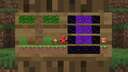
A data pack that adds a playable version of Minecraft, on a sign. From breaking your first tree, all the way to beating the ender dragon.
IMPORTANT: The sign must be placed in creative to work
MINIMUM VERSION: Snapshot 25w34b
This data pack uses the new snapshot features that enables rendering sprites on signs.
Snaphot features are subject to change and this data pack may break in other versions.
Features:
Breaking/placing blocks
Entities
How to use:
Notes:
To break/place a block as part of the background, hold your "backwards" key and left/right click.
Similarly, use the same key to dismount boats and Minecarts.
Limitations:
Must manually load in the ender dragon by going to the end yourself. Afterwards, the ender dragon will stay loaded.
Potion effects are unimplemented.
Items not listed are unimplemented.
Certain damage types might not be transferred to the player correctly.
Multiplayer has limited support, but was not tested extensively.
IMPORTANT: The sign must be placed in creative to work
MINIMUM VERSION: Snapshot 25w34b
This data pack uses the new snapshot features that enables rendering sprites on signs.
Snaphot features are subject to change and this data pack may break in other versions.
Features:
Breaking/placing blocks
Entities
- Mobs that you can fight, kill, and loot
- Rideable boats and minecarts
- Items can be droppped and picked up
- Ender Dragon, with modifications to make playable on a sign
- Melee weapons with accurate damage and enchantments
- Bows with accurate damage and enchantments, modified to make playable on a sign
- Shovels/hoes
- Buckets
- Plantable crops
- Bone meal
- Flint and steel
- Redstone (limited)
- Eye of ender (placeable in portal frame)
- Spawn eggs
How to use:
- Run the command "function sign:give" to give yourself a sign, chair, and controller
- Place the controller where you want your game to be initialized. The sign will use that slice along the x-axis as the world to play in.
- Place down the sign (must be placed on a wall).
- Place down the chair facing the sign. You must sit in the chair to control the player.
- Start playing! Left/right click to break/place blocks and use items.
Notes:
To break/place a block as part of the background, hold your "backwards" key and left/right click.
Similarly, use the same key to dismount boats and Minecarts.
Limitations:
Must manually load in the ender dragon by going to the end yourself. Afterwards, the ender dragon will stay loaded.
Potion effects are unimplemented.
Items not listed are unimplemented.
Certain damage types might not be transferred to the player correctly.
Multiplayer has limited support, but was not tested extensively.
More like this
 Minecraft but Signs Drop Op LootMinecraft 1.13 - 1.17 Minecraft, but Data Pack
 Cowin_
•4/17/21 11:14
8.7k 2.8k 8x 11217
Cowin_
•4/17/21 11:14
8.7k 2.8k 8x 11217
6700255
119












 BebuPlayz
Have something to say?