


• • 2/6/26 11:23 am • 4 logs
- 489 views • 1 today
- save_alt 32 downloads
- Game Version
- Minecraft 1.20.1
- Progress
- 100% complete


11
BGM Fields (Forge 1.20.1)
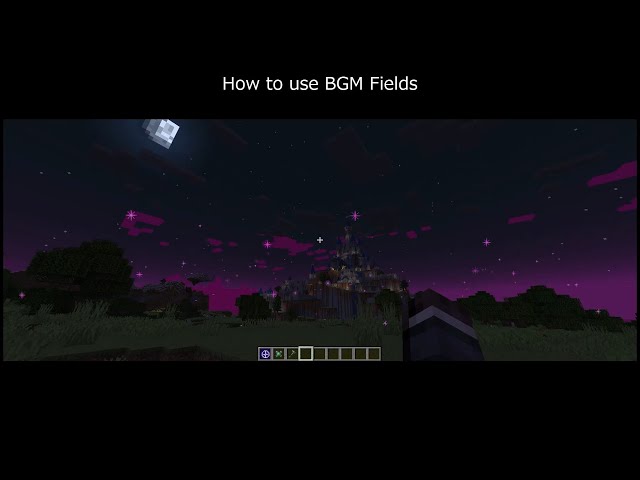
🎥 **Watch the BGM Fields demo:**
https://www.youtube.com/shorts/meaJewowPdg
BGM Fields lets you place Realm Blocks that create server-authoritative “BGM zones” (Realms). When a player is inside a Realm, the Realm can:
・Switch BGM (single track or playlist)
・Apply “Vision” visuals (fog / overlay / sky-only tint / particles / colored precipitation)
・Optionally render a glowing boundary ring (visible from inside and outside)
This mod does not send
.ogg audio files over the network. Music is referenced by Sound Event IDs; you provide the actual audio via a client resource pack (per-player) or a server-pushed resource pack.Requirements
Minecraft 1.20.1Forge 47.x
Multiplayer: install the mod on both the server and all clients.
Getting Started
1) Craft and place a Realm Block.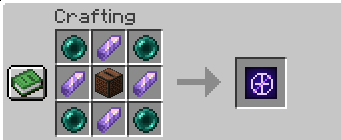
2) Right-click the Realm Block to open the settings screen.
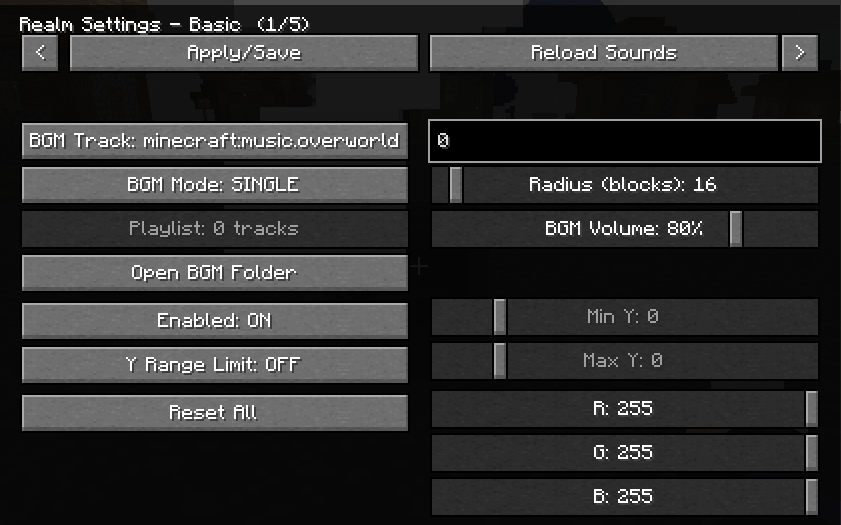
3) Set:
・Radius (max 300)
・Y-range (optional; you can limit the realm vertically)
・Realm color (used by visuals)
・BGM settings (track or playlist)
・Per-realm BGM volume (0–100, default 80)
Only the owner can edit the Realm. OPs (permission level 2) can also edit.
Realm Placement Rules
・If another player’s Realm overlaps the new one, placement is denied.・Even for the same owner, partial overlap is denied.
・Full nesting is allowed (one Realm completely inside the other).
BGM: How Tracks Work
A track is a Sound Event ID (
namespace:path). Examples:- Vanilla music:
minecraft:music.overworld
- Vanilla music:
- User BGM generated by this mod:
bgmfieldmod:bgm.my_song
- User BGM generated by this mod:
BGM Modes:
- Single: play one Sound Event.
- Playlist: multiple entries; each entry has:
track(Sound Event ID)
loop(true/false)
- Playlist: multiple entries; each entry has:
Add Your Own Music (Client-side, per player)
BGM Fields auto-creates a folder resource pack called:
BGMFields_UserBGM
Put your
.ogg files under:resourcepacks/BGMFields_UserBGM/assets/bgmfieldmod/sounds/bgm/Then reload resources (in-game “Reload” button or
F3+T).You do not need to write
sounds.json yourself; BGM Fields generates it automatically.Sound ID mapping:
my_song.ogg→bgmfieldmod:bgm.my_song
dungeon/boss.ogg→bgmfieldmod:bgm.dungeon.boss
Notes:
- Filenames are sanitized to valid resource paths (spaces, uppercase, etc. are converted).
- The resource pack still needs to be enabled in Minecraft’s Resource Packs menu (that is vanilla behavior). There is also an optional client config that can attempt to auto-enable it.
Provide Music to Everyone (Server Resource Pack Push)
BGM Fields can ask clients to apply a server resource pack on join.
Two modes:
- external-url: set
serverResourcePack.urlto a public URL to a.zipresource pack.
- external-url: set
- internal-http: leave
serverResourcePack.urlempty; the server hosts the.zipvia a built-in HTTP server.
- internal-http: leave
Config keys (in the Forge common config):
serverResourcePack.enabled
serverResourcePack.required
serverResourcePack.publicHost
serverResourcePack.url
serverResourcePack.port
serverResourcePack.packFile
serverResourcePack.sha1
serverResourcePack.prompt
Zip requirements:
pack.mcmetaandassets/must be at the zip root (zipping the parent folder often breaks this).
Vision (Visual Effects)
Each Realm has a “Vision” visual module (server-authoritative settings synced to nearby clients). You can control:
・Master enable
・Strength (0–100)
・Ramp up/down (fade in/out)
・Fog
・Overlay
・Sky Tint (sky-only)
Can follow the realm color or use an independent RGB
Gradient is optional
・Particles
Colored precipitation (rain/snow via custom particles)
Boundary visualization (glowing ring)
Realm Vision Keybind (Owner Utility)
There is a client keybind:
V= toggle “Realm Vision” ON/OFF
This is used for owners to reveal the real Realm Block when the Realm is disguised:
Owner + Realm Vision ON + Sneak (Shift) → show the real block
Commands (OP)
/bgmfields_rp start
/bgmfields_rp stop
/bgmfields_rp send
/bgmfields_rp reload
Notes / Tips
If your particle setting is “Minimal”, some Vision particles/precipitation may be hard to see.
The boundary ring is designed to be visible both from inside and outside the Realm (useful for large radii).
4 Update Logs
Update #4 : by onmi1855 02/16/2026 6:32:33 amFebruary 16 @ 11:32 am UTC
1.4.0 (2026-02-16)
- Fix: Playlist playback is more stable (songs should move to the next track properly).
- Fix: Reduced cases where background music could overlap.
- Reply (music overlap / playlist report): Thanks for reporting — please try v1.4.0 and let me know if it still happens.
- Fix: Playlist playback is more stable (songs should move to the next track properly).
- Fix: Reduced cases where background music could overlap.
- Reply (music overlap / playlist report): Thanks for reporting — please try v1.4.0 and let me know if it still happens.
LOAD MORE LOGS
6843001
7




 Sibluee



 mattmcbeardface
 dangeroni
 99ki
99ki

 Alextremo
Have something to say?