


• 7/29/24 9:18 pm
- 14.8k views • 10 today
- save_alt 1.7k downloads • 2 today
- Game Version
- Minecraft Bedrock
- Progress
- 100% complete


477
More info https://github.com/kirbycope/display-bedrock#readme
Display blocks and items are now in Minecraft Bedrock! A "Display" block/item (by default) has no collision and can be placed anywhere.
Made with version 1.21.2.
Usage
To summon a "cobblestone" block, run `summon display:block` (cobblestone is the default texture).
To summon a "stone" block, run `summon display:block ~ ~ ~ ~ ~ stone` (stone is an event that turns the block to stone).
To summon an "apple" item, run `summon display:item` (apple is the default texture).
To summon a "diamond" item, run `summon display:item ~ ~ ~ ~ ~ diamond`.
To scale a block to 1/10th, run `event entity @e[type=display:block] scale_0.1`.
To scale an item to 100% (50% is the default), run `event entity @e[type=display:item] scale_1.0`.
To add collision to a block, run `event entity @e[type=display:block] add_collision`.
To add collision to an item, run `event entity @e[type=display:item] add_collision`.
Place two armor stands and tag one "A" and the other "B". Stand between them and run `function summon-cobblestone-platform`. The platform should move between the two armor stands.
Display (Bedrock Addon)
Display blocks and items are now in Minecraft Bedrock! A "Display" block/item (by default) has no collision and can be placed anywhere.
Made with version 1.21.2.
Tips
- Type `/summon display:block ~ ~ ~ ~ ~ ` to see the suggestions.
- Type `/summon display:item ~ ~ ~ ~ ~ ` to see the suggestions.
- When summoning, replace `~ ~ ~ ~ ~` with ` ~ ~ ~ 0 ~` or ` ~ ~ ~ 90 ~` to rotate with the grid.
- You can teleport the "block" or "item" and rotate it, try `teleport @e[type=display:block] ~ ~ ~ ~90 ~90`.
Usage
To summon a "cobblestone" block, run `summon display:block` (cobblestone is the default texture).To summon a "stone" block, run `summon display:block ~ ~ ~ ~ ~ stone` (stone is an event that turns the block to stone).
To summon an "apple" item, run `summon display:item` (apple is the default texture).
To summon a "diamond" item, run `summon display:item ~ ~ ~ ~ ~ diamond`.
To scale a block to 1/10th, run `event entity @e[type=display:block] scale_0.1`.
To scale an item to 100% (50% is the default), run `event entity @e[type=display:item] scale_1.0`.
To add collision to a block, run `event entity @e[type=display:block] add_collision`.
To add collision to an item, run `event entity @e[type=display:item] add_collision`.
Floating Platform Demo
Place two armor stands and tag one "A" and the other "B". Stand between them and run `function summon-cobblestone-platform`. The platform should move between the two armor stands.
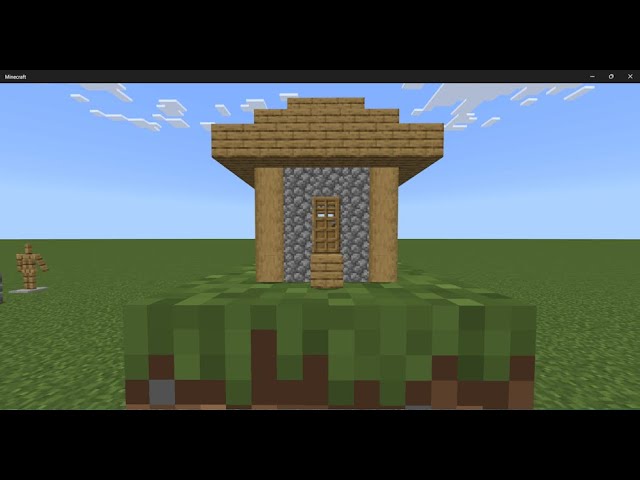
Tiny House Demo
Run `function summon-tiny-house`.More like this
 Item Morph AddonMinecraft 1.20.6 Other Mod
 Flappyguy
1/8/25 11:47
• posted 5/15/24 12:30
4.2k 758x 366
Flappyguy
1/8/25 11:47
• posted 5/15/24 12:30
4.2k 758x 366
 The "Not A Block" Block Addon For Minecraft Bedrock EditionMinecraft 1.21.11 Other Mod
 CarrotNoRanch
•12/11/25 4:03
625 95 1x 622
CarrotNoRanch
•12/11/25 4:03
625 95 1x 622
 EarthUser
 Tobolyo
6357641
7







 Bouta_14MC
 Vitinho2000

 BifftyNiffty
 Fledje06
Have something to say?
TLDR - It is 100% free to do what you want! No attribution required.