

• 10/5/26 8:38 pm
- 15 views • 9 today
- save_alt 0 downloads
- Game Version
- Minecraft 1.21.1
- Progress
- 100% complete


3
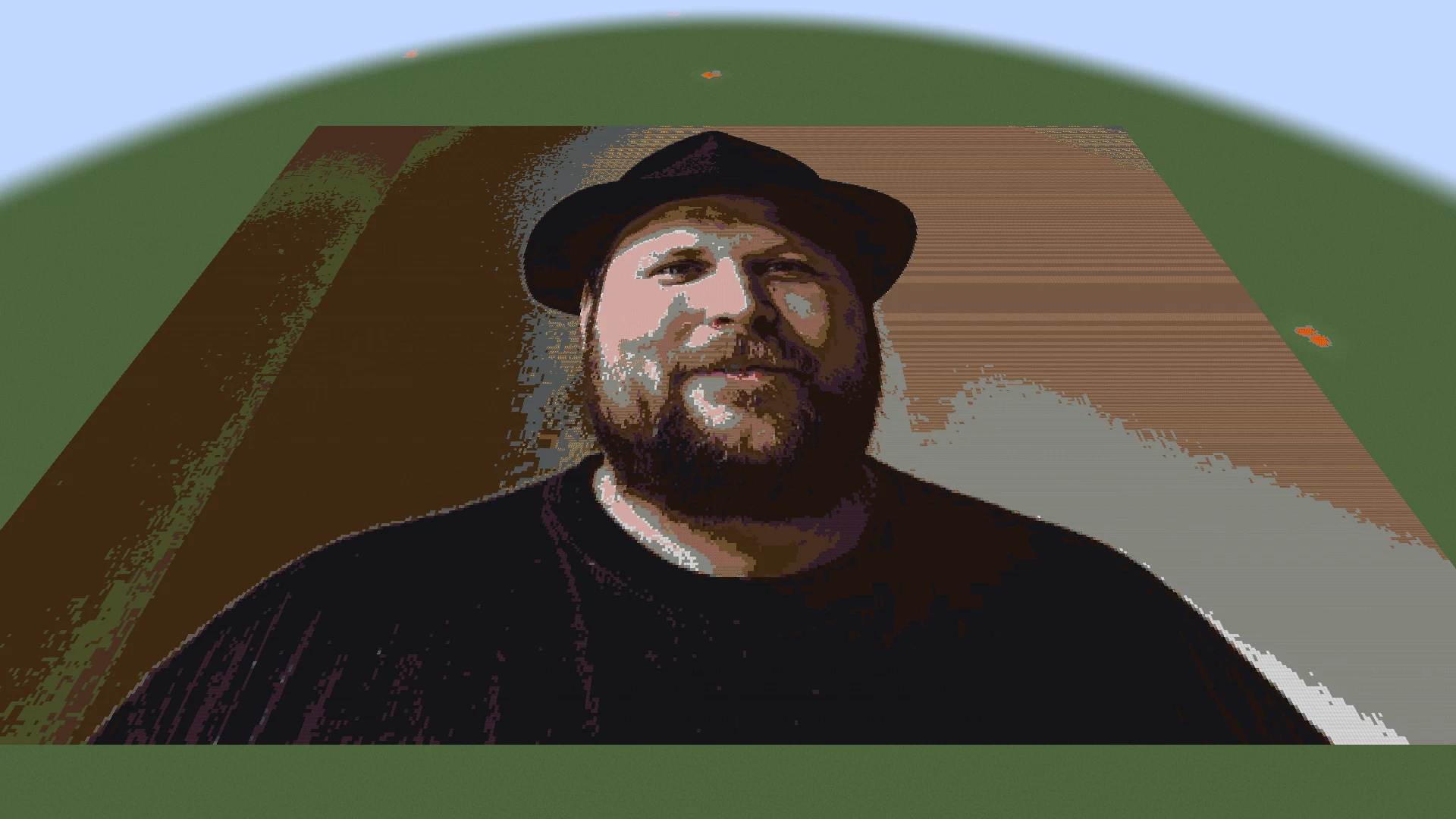
Turn any image into block art instantly. Built for creative map builders.
Paste a URL or local file, set a size, and place it as a massive flat pixel art on superflat. No schematics, no external programs, no WorldEdit needed. Works in Singleplayer, Creative, and LAN.
Features:
URL Support: Place directly from https://... with auto-caching.
Instant for Creative: 25,000 blocks/tick, 500k blocks in 1 tick in Creative.
LAN Ready: Permission level 0 - works for anyone in Open to LAN > Allow Cheats: ON, no OP needed.
Smart Palette: 180+ building blocks only. No beds, slabs, stairs, cobwebs.
Use /itg palette full to regenerate from your modded blocks.
Preview Border: White concrete border + red corners shows exact footprint before placing
Undo / Clear: /itg undo and /itg clear with full block restore
Dithering: Floyd-Steinberg dithering for photos (true), off for logos/text (false)
GUI: Black & Green terminal themed GUI - /itg or /itg gui
Commands:
/itg gui - Open the GUI
/itg preview <path/url> <w> <h> <dither> - Show border preview
/itg place <path/url> <w> <h> <dither> - Place the image
/itg convert <path/url> <w> <h> <dither> - Alias for place
/itg undo - Undo last placement
/itg clear - Clear preview border
/itg palette - Show palette size
/itg palette full / regen - Regenerate clean building palette
Supports quotes for spaces: /itg place "url//my image.png" 512 512 true
Recommended Setup:
1. Superflat world (preset: classic flat)
2. Creative mode
3. Open to LAN if building with friends
4. Run /itg palette full once
5. Run /itg place url//my-image.png 512 512 true, or use the GUI /itg or /itg gui
Sizes: 16-64 icon, 128 crisp, 256 poster, 512 big, 1024 huge (max). You can manually edit the size.
Installation:
Put in mods/ folder. Requires NeoForge. Images go in config/itg/images/ or use direct URLs. Cached URLs in config/itg/cache/.
For Map Makers:
Built specifically for creative + LAN workflow. No survival checks, no block updates (flag 2), no lighting lag. Designed to replace the Spritecraft + Litematica + WorldEdit pipeline with one command.

Paste a URL or local file, set a size, and place it as a massive flat pixel art on superflat. No schematics, no external programs, no WorldEdit needed. Works in Singleplayer, Creative, and LAN.
Features:
URL Support: Place directly from https://... with auto-caching.
Instant for Creative: 25,000 blocks/tick, 500k blocks in 1 tick in Creative.
LAN Ready: Permission level 0 - works for anyone in Open to LAN > Allow Cheats: ON, no OP needed.
Smart Palette: 180+ building blocks only. No beds, slabs, stairs, cobwebs.
Use /itg palette full to regenerate from your modded blocks.
Preview Border: White concrete border + red corners shows exact footprint before placing
Undo / Clear: /itg undo and /itg clear with full block restore
Dithering: Floyd-Steinberg dithering for photos (true), off for logos/text (false)
GUI: Black & Green terminal themed GUI - /itg or /itg gui
Commands:
/itg gui - Open the GUI
/itg preview <path/url> <w> <h> <dither> - Show border preview
/itg place <path/url> <w> <h> <dither> - Place the image
/itg convert <path/url> <w> <h> <dither> - Alias for place
/itg undo - Undo last placement
/itg clear - Clear preview border
/itg palette - Show palette size
/itg palette full / regen - Regenerate clean building palette
Supports quotes for spaces: /itg place "url//my image.png" 512 512 true
Recommended Setup:
1. Superflat world (preset: classic flat)
2. Creative mode
3. Open to LAN if building with friends
4. Run /itg palette full once
5. Run /itg place url//my-image.png 512 512 true, or use the GUI /itg or /itg gui
Sizes: 16-64 icon, 128 crisp, 256 poster, 512 big, 1024 huge (max). You can manually edit the size.
Installation:
Put in mods/ folder. Requires NeoForge. Images go in config/itg/images/ or use direct URLs. Cached URLs in config/itg/cache/.
For Map Makers:
Built specifically for creative + LAN workflow. No survival checks, no block updates (flag 2), no lighting lag. Designed to replace the Spritecraft + Litematica + WorldEdit pipeline with one command.
More like this


7066809
7






 Georgef551
 agent94055

 XavierTomasino

 Magersers
Have something to say?