
• 10/6/26 6:57 pm
- 22 views • 15 today
- save_alt 5 downloads • 4 today
- Game Version
- Minecraft 1.21.1
- Progress
- 100% complete


3
Relative Commands - NeoForge 1.21.1
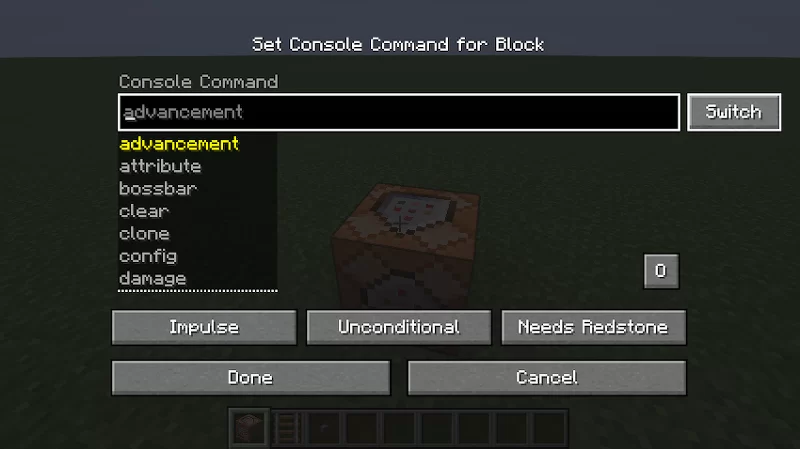
Relative Commands adds a small "Switch" button to the Command Block UI that toggles all coordinates in the command box between Absolute and Relative coordinates.
Ever placed a command block and had to manually convert every absolute coordinate to ~ ~ ~ ?
FEATURES
- One-click conversion: Absolute <-> Relative
- Works on Command Blocks (Impulse/Chain/Repeat)
- Position-aware: uses the actual block's BlockPos, not player pos
- Handles ~ ~ ~ format with offsets (~1, ~-2, ~0.5)
- Vanilla friendly - no extra keybinds, just one button
Inspired by Nettakrim, author of Coordinated Command Blocks for Fabric.
Relative Commands adds a small "Switch" button to the Command Block UI that toggles all coordinates in the command box between Absolute and Relative coordinates.
Ever placed a command block and had to manually convert every absolute coordinate to ~ ~ ~ ?
FEATURES
- One-click conversion: Absolute <-> Relative
- Works on Command Blocks (Impulse/Chain/Repeat)
- Position-aware: uses the actual block's BlockPos, not player pos
- Handles ~ ~ ~ format with offsets (~1, ~-2, ~0.5)
- Vanilla friendly - no extra keybinds, just one button
Inspired by Nettakrim, author of Coordinated Command Blocks for Fabric.
More like this


7067527
7









 Skykindpotato28



Have something to say?