
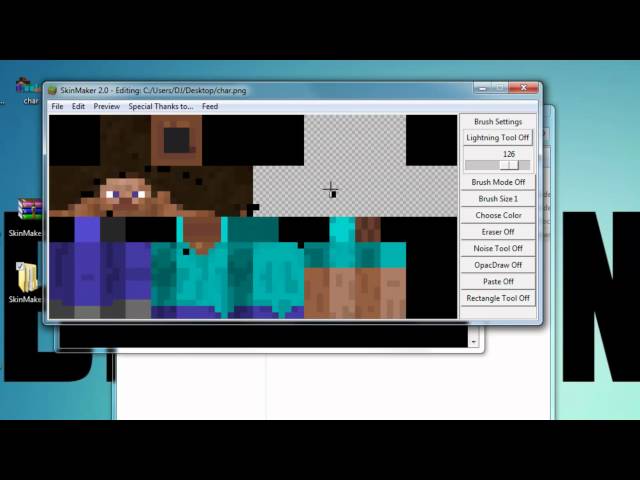


• • 4/26/13 4:19 pm • 39 logs
- 59.3k views • 0 today
- save_alt 14.4k downloads
- Game Version
- Minecraft 1.5
- Progress
- 95% complete
Added CreditEverybody who had suggestions and requests!


204
Click to reveal
Announcement
Since my coding skills really have improved since I wrote this version and I have finally found the old code is a big pile of sh**, I'm proud to announce that I have decided to rewrite it - once again.
The new version will contain loads more features and the ability to create custom brushes.
Finishing this project is one of my New Year Resolutions, I've already made quite some progress with the new System.
THANK YOU
First of all, I want to thank everybody who downloaded the SkinMaker, commented, gave it a diamond or whatever. Without all you people, I would have stopped development the day I started it.
THANK YOU EVERYBODY FOR OVER 27000 VIEWS AND MORE THAN 10000 DOWNLOADS!!!
Most Standard skins are made by Vrej, and I am really thankful that he let me use them.
General Information
-> There is a Linux executable available
-> There will not be a Mac version as far as I can see
-> There can be problems with AntiVirus engines, but I assure you that this is not a Virus!
This has been approved by Site Moderators more than once.
-> If you have questions, post them in the comments.
The SkinMaker 2.0
... is dedicated to all the people who supported me in the making of the SkinMaker. I used the past two days to sit down and start over froms scratch. When I did so, I kept all the old functions, but I optimized the code for maximum speed. Instead of over 1300 lines of code, It now only has about 700. Thats 47% less! There are more updates to come in the future as this is undoubtedly my favourite program.Content
- News
- About
- Features
- Bugs
- Installation Info
- Download
News
07.05.2012:
Today, I decided to go open source. This means that you can access the SkinMaker on any system that runs Python. By doing this, I hope to avoid problems with different versions and also AntiVirus Engines blocking download and/or execution of the program.
12.05.2012
Since many of you guys had problems executing, I have now uploaded a different version of the SkinMaker to the Mediafire Folder. It alos includes some new tools I am still working on because they're not really doing what they're supposed to do. Anyway, try them if you want ;)
26.07.2012
Yesterday, I migrated the downloads to another server, removing mediafire from this project. I am still testing and playing around with stuff, more downloads will be moved in a while.
I also created some huge Download banners:
Banner
Not very useful, but fun xD
Have a nice day!
About
The SkinMaker is a program written in Python which uses different UI-libraries and Imaging Libraries to create Minecraft Skins. The User has different Tools available to edit the Canvas with the Skin the way he wants to. Ito s the first project I started solely for the sake of making it, because I felt like making a Windowed Application that implements different Drawing functions. In the making of the program, 12 different Versions have been released to date.
Features
Check them out by downloading and trying them ;-)
Review/Tutorial by BigBigNation
Outdated Installation Info (for versions older than 1.7)
Installation Info (IMPORTANT)
Plan A:
- Go to the downloads on Mediafire.com (Download Button) first. There are two folders in that directory, a Windows and a Linux version. Enter the sub-directory according to your OS. There are multiple versions in either directory. Download the newest version and unzip it using 7zip, WinRAR or a similar program.
- Now just double-click the start.bat and wait a few seconds
- If it doesn't work, try Plan B
Plan B:
- Go to the open source repository on code.google.com (no longer updated, sry) and download both the SkinMaker Main file and the PreviewWindow file. They're the source files of the SkinMaker. The following steps are different for each OS:
- If you use Linux:
- Python version 2.6 was shipped with your Linux system. Try typing "python2.6" in the console window. It should say some sh** about what version it is and open an active interpreter. If this worked, just type "quit()"in the command line.
- If Step one worked, skip this step.
Open the console, type "su" and log in as root user. Then type "aptitude install python2.6".
Your PC has now installed python. Repeat step one, and if it works, continue. - Install PIL via the aptitude!!!
- Save the main.py and the PreviewWindow.py in the same directory, it doesn't matter where.
Now open the console, use "cd " to change directory until you are in the same folder as the files. Then continue to type "python2.6 main.py" - Have fun!!!
- If you use Windows or Mac:
- First of all: If you already installed python, just double-click the main.py to start it and skip the other steps.
- Go to http://python.org/download/. Get the installer Version 2.7 and start it. I will not explain the installing process here because there are lots of detailed tutorials out there.
- Download and install PIL, just google "pil download" and click the first result.
- Once you did that, just save the main.py and the PreviewWindow.py in the same directory and double-click the main.py
- Have fun!!!
Downloads
If the compiled versions don't work for you, go to the open source repo (outdated) and download all files there. Then follow the Installation Instructions for Plan B.
39 Update Logs
Update #39 : by 4719059340028218 04/26/2013 4:19:42 pmApril 26, 2013 @ 8:19 pm UTC
bewmp
LOAD MORE LOGS
More like this
 Building Blocks Mod MakerMinecraft 1.6.4 Functional Mod
 Guff
1/30/14 7:23
• posted 9/7/13 5:31
21.2k 3.2k 48x 11913
Guff
1/30/14 7:23
• posted 9/7/13 5:31
21.2k 3.2k 48x 11913 Ghost 2.0 IS HERE!!!!!!!!!!!!!!Minecraft 1.8.1 Program Mod
 A_Black_5tar
1/21/16 10:36
• posted 1/27/14 1:20
20.7k 3.1k 1x 23318
A_Black_5tar
1/21/16 10:36
• posted 1/27/14 1:20
20.7k 3.1k 1x 23318 Minecraft Version Swapper 2.0Minecraft 1.3.1 Program Mod
 martin2250
6/15/12 12:26
• posted 6/14/12 11:09
9.8k 2k 100x 15620
martin2250
6/15/12 12:26
• posted 6/14/12 11:09
9.8k 2k 100x 15620
 xXdragon15Xx
837182
7
![[1.6.x][Bukkit]Network Playtime Minecraft Mod](https://static.planetminecraft.com/files/resource_media/screenshot/1339/VQp1ghw_6433637_thumb.jpg)


![[Bukkit][1.4.7] UberJump Plugin Minecraft Mod](https://static.planetminecraft.com/files/resource_media/screenshot/1246/UJ_4135619_thumb.jpg)

 User6748580G





Have something to say?
http://www.planetminecraft.com/collection/743/tools/
it's been a long while since the last time I used this, and I once again have issues saving my edited skins;
I save it the correct way, and I get no error, but when I go look for my saved skin, it's not in the file I saved it in. It's nowhere to be found, when I searched on my computer I found the 'skin' in my temporary files, but it fails to open it.
How do I save my skin correctly?
Invisible skins are impossible without having a modded client. Only people with a mod like the one in the voxel modpack can see them