
• 3/17/20 12:46 pm
- 93 views • 0 today
- save_alt 0 downloads
- Format
- Java
- Model
- Steve

0
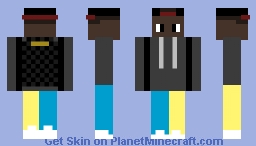
This is another one of my skins. I hope you like it!
(im still experimenting with skin color, hairstyles, and accessories)
Download and Install instructions (please read!)
For Desktop and Laptop Launcher (version(s) 2.1.12871 and up)
First, find a blue panel containing three (3) buttons
Next, Click the middle button on the panel - it should say "Download Minecraft skin"
Next, it should download Automatically to your computer via your current web browser.
Next, open up the "minecraft launcher" Application.
Next, you will find a dark grey bar at the top of the front page.
Next, click the according text that states "skins"
Next, you will find near the centre of the page a + button that says "New skin"
Next, click that button and at the centre of the screen you should find an option that says "skin file"
Next, there should be a button that says "browse"
Next, there should be a popup containing all of the image files in your computer.
Next, look through your files by searching the file name of this skin.
Next, a character will show up on the screen that should look like the skin. If that doesn't happen, try repeating the whole process again.
Next, Create a name for the skin (it can be anything you want)
Next, at the bottom right corner of your screen there will be a green button that says "save and use"
Lastly, start up minecraft (not fortnite) and enjoy!
(im still experimenting with skin color, hairstyles, and accessories)
Download and Install instructions (please read!)
For Desktop and Laptop Launcher (version(s) 2.1.12871 and up)
First, find a blue panel containing three (3) buttons
Next, Click the middle button on the panel - it should say "Download Minecraft skin"
Next, it should download Automatically to your computer via your current web browser.
Next, open up the "minecraft launcher" Application.
Next, you will find a dark grey bar at the top of the front page.
Next, click the according text that states "skins"
Next, you will find near the centre of the page a + button that says "New skin"
Next, click that button and at the centre of the screen you should find an option that says "skin file"
Next, there should be a button that says "browse"
Next, there should be a popup containing all of the image files in your computer.
Next, look through your files by searching the file name of this skin.
Next, a character will show up on the screen that should look like the skin. If that doesn't happen, try repeating the whole process again.
Next, Create a name for the skin (it can be anything you want)
Next, at the bottom right corner of your screen there will be a green button that says "save and use"
Lastly, start up minecraft (not fortnite) and enjoy!
More like this

 Naimarra
 caraaa
 h3ath
h3ath
 Scriffti
 ITSKATO
4513768
5







 Loquillo
 cadbane86140


 candlemouse

 Wyns
Wyns
 NetheriteMan12
 Dazzles
Have something to say?