


• • 8/7/26 2:35 am • 9 logs
- 8.8k views • 5 today
- save_alt 1.4k downloads
- Game Version
- Minecraft Bedrock
- Resolution
- 16x
- Progress
- 95% complete
- Changes include
- Environment
- GUI
- Items
- Misc
- Mobs
- Models
- Particles

88
Minecraft's textures are great, but over the years, the little bits of rough unpolished-ness start to pile up. This pack aims to make the game just generally look less broken by adding and tweaking textures to things that aren't quite as great as they could be. Especially that XP bar.
Important:
Due to technical issues, the grass side fix had to be moved to its own, separate resource pack. It can be found here.
Blocks:
Important:
Due to technical issues, the grass side fix had to be moved to its own, separate resource pack. It can be found here.
Blocks:
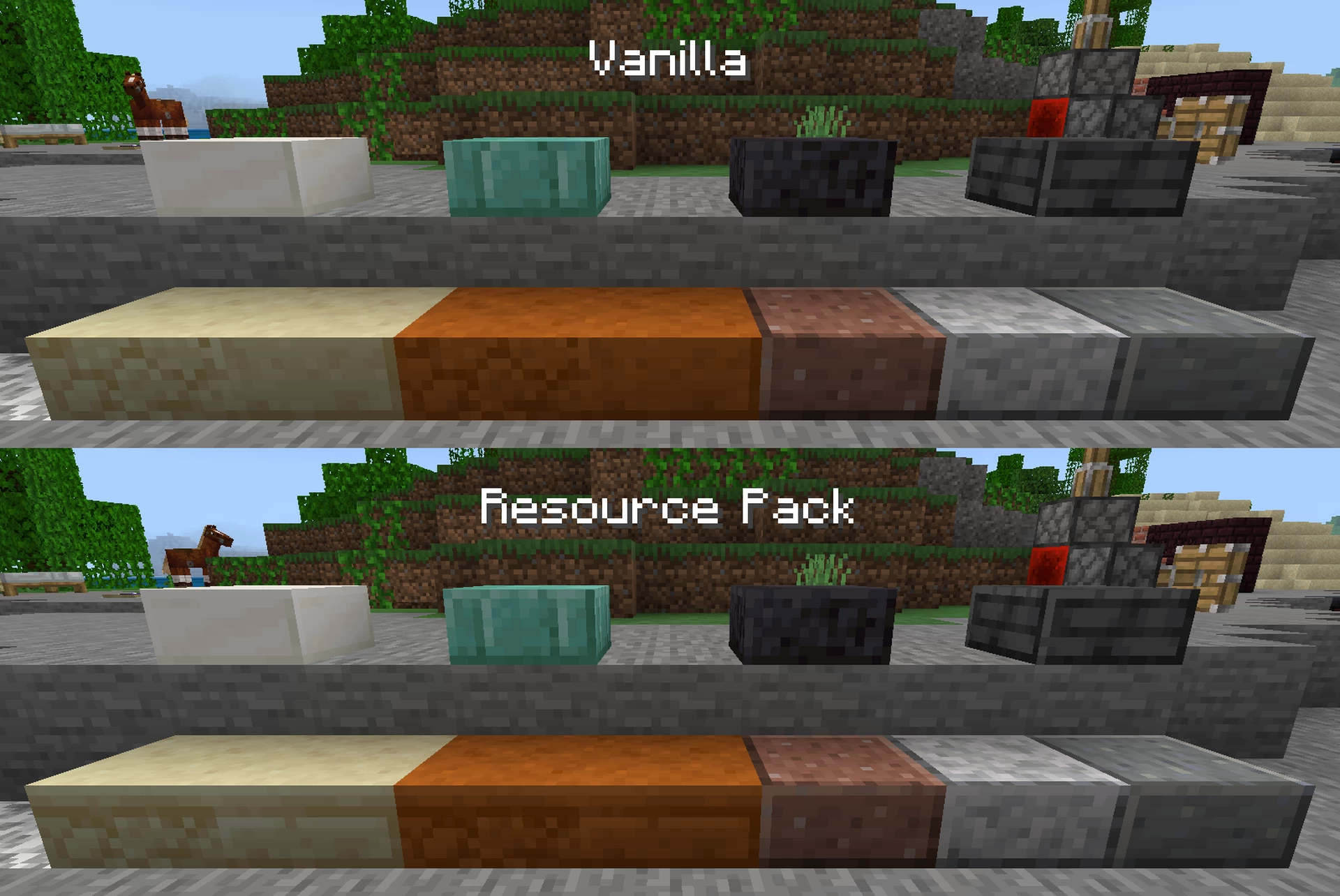
- Clay, Terracotta, Stained Terracotta, Obsidian, and Crying Obsidian no longer rotate their textures randomly.
More Blocks
- Polished and sandstone slabs now have proper side textures.
- The bottoms of Quartz Slabs now use the correct texture.
- Crafting Tables, Fletching Tables, and Beehives now have proper bottom textures.
- Blackstone Walls, Stairs, and Slabs now use the correct texture on the top and bottom.
- Gilded Blackstone now has a proper top and bottom texture like regular Blackstone does.
- Tops and bottoms of Sandstone Walls no longer use the side texture.
- The shading on all Sandstone and Red Sandstone blocks now matches Sand and Red Sand like it's supposed to.
- Deepslate Ores now have proper top and bottom textures.
- Lily Pads are now the same color in item form as in block form.
- Grass Blocks, Short Grass, Tall Grass, Ferns, Large Ferns, Bushes, Vines; and Oak, Birch, Spruce, Jungle, Acacia, Dark Oak, and Mangrove Leaves now use their Java Edition colors in item form.
- The grass colormap is now more accurate to Java Edition.
- Grass Blocks no longer have irrelevant pixels change when changing to or from Snowy Grass Blocks.
- Dirt Paths are now shaded correctly.
- Dirt no longer randomly rotates its texture on its side, similar to Java Edition, causing it to change to and from Grass Blocks more smoothly.
- Netherrack no longer rotates when changing to or from Nylium.
- Many blocks no longer have transparent seams.
- The UV mapping on Cocoa Pods and all Torches is now more accurate.
- Fully grown Cocoa Pods now use their updated top and bottom texture from Java Edition, which is pixel-size-consistent with the rest of the pod.
- The trim on the inside of Pistons is now properly visible like on Java and Legacy Console Edition.
- Pistons now use the correct texture in item form.
- The backs of Observers no longer have irrelevant pixels change when activated or deactivated.
- The tops and bottoms of Hay Bales now use the same color palette as the sides.
- Shifted the texture for Mud Bricks a pixel to the left for consistency with other types of bricks.
- Swamps, Swamp Hills, and Warm Oceans now have the correct water transparency again.
- The Pale Oak Sign texture now matches Java Edition.
- Fixed a miscolored pixel on Cherry Leaves.
- Opaque Leaves now use their updated appearance from Java Edition, which is more defined and looks more natural when transitioning from or to transparent leaves.
- The bottoms of cacti are now the same green as their sides and tops.
- Light Blocks now use their updated textures from Java Edition; which are pixel-size-consistent and rendered correctly.
- Kelp, Seagrass, Campfire, and Soul Campfire animations are more accurate to Java Edition.
- Many blocks that become darker or brighter at a distance or a sharp angle no longer do so.
- Fixed subsurface scattering on the east side of very cracked Sniffer Eggs.
Particles:
- Explosions now use their texture from Java Edition (which is pixel-size-consistent with most other things).
More Particles
- Campfire smoke now fades out, instead of disappearing abruptly.
- The particles for Item Frames and Glow Item Frames now show Birch Planks instead of a weird, black border.
- The particles for all head and skull blocks now have custom textures instead of using the Soul Sand texture.
- Copper Torches' flames are now the correct color.
- Hanging Signs now use Stripped Log textures for their particles instead of Planks.
- There is no longer a miscolored pixel on the Firework trail particle.
User Interface:
- Left- and right-most ends of the Hotbar now render at the correct opacity.
- Items and their stack counts are now layered above the selected slot like on Java and Legacy Console Edition.
- The outline of the Selected Slot no longer becomes transparent when selecting the left- or right-most sides of the Hotbar.
- The Experience Bar now uses its texture from Java and Legacy Console Edition and stretches the correct length when using touch controls.
- The Level number now uses an outline, like the rest of the HUD, instead of a dropshadow.
- The color of the level number is now more accurate to Java Edition.
- The half and empty icons for the Armor Bar on the HUD now use their updated Java Edition textures.
- The Hotbar, item durability bar, and Bundle storage bar are now aligned to the pixel grid.
More User Interface
- The Hotbar, Inventory Grid, and Inventory Label in Container Screens (Inventory, Chest, etc.) have been raised to the correct positions.
- Texture of Player Preview Panel Border is now more accurate to Java Edition.
- Empty Armor and Off Hand Slots now use their updated textures from Java Edition.
- The top- and bottom-left corners on all Container (and similarly styled) Screens are now more accurate to Java Edition.
- The item stack count in container screens is layered correctly, like it was before game version 1.21.
- Item Locks are now consistently layered above their associated item in container screens, like they are on the HUD.
- The highlight that appears when hovering over an item now looks the same as in Java Edition.
- The top-left and -right corners on the Toolbar are now consistent with those of the container screens it's attached to.
- The spacing between the layout buttons in the Inventory is now consistent.
- The Layout Buttons in the Inventory turn now green when hovered over, like other buttons.+
- The right-most pixel of Container Scroll Panels (Recipe Book, Villager Trades, etc.) is no longer cut off.
- The textures for Container Scroll Panels are now more consistent with their scroll bars and the rest of the UI.
- The Search Bar in the Recipe Book / Creative Inventory is now a pixel shorter, vertically, so it aligns with the Craftable Toggle.
- Relatedly, the Craftable Toggle in the Recipe Book is now aligned with the pixel grid.
- The Craftable Toggle in the Recipe Book is now a pixel farther to the left to line up with the rest of the screen.
- The Recipe Book and Creative Inventory no longer scroll two pixels lower down than they should.
- Removed the stupid ugly shadow mojang added to the Recipe Book.
- Fixed the layering on Furnace Recipe Book tabs and the scaling on their icons.
- Fixed the scaling on both Recipe Book search tabs' icon and centered it.
- The various elements of the Bundle UI are now properly aligned with each other.
- The selection area and highlight for the output slot in the Cartography Table is now full size like other Container Screens.
- The Close Button on the Cartography Table Screen is no longer a pixel lower down than it should be.
- The Toolbar on the Cartography Table Screen is no longer needlessly higher contrast than it needs to be.
- The Close Button now properly disappears when using a controller on several screens where it doesn't in vanilla.
- The texture for the number of levels needed to enchant an item with an Enchanting Table no longer moves up and down when the button becomes selectable or unselectable.
- The bottom Enchanting Button on the Enchanting Screen is no longer slightly offset.
- The Bottle and Fuel Slots on the Brewing Stand Screen now use their updated Java Edition textures.
- The Arrow and Bubbles on the Brewing Stand screen now use the correct colors.
- The pipes on the Brewing Stand Screen are now layered correctly like they used to be.
- The background for the Horse Renderer on the Horse Screen is now consistent with that of the Player Renderer in the Inventory and with Java Edition.
- The Close Button on the Horse Screen is no longer needlessly the compact one.
- The sides of the texture for selecting an item with touch controls are no longer transparent.
- Various Gamepad Helpers now properly disappear when Hide Controller Hints is enabled.
- Adjusted positioning of various Gamepad and Keyboard Helpers.
- Candle Cakes now use the item texture in the command auto-fill for consistency with regular Cakes.
- Pitcher Crops now use their stage 3 top-half texture in the command auto-fill for consistency with Torchflower Crops.
- The hover and pressed textures on the Realms button on the Title Screen are no longer swapped.
- The icon for the General Tab in the Settings Screen is now the correct size and no longer shrunken weirdly.
- The pixel where the bevels meet on all tabs is now consistently the correct color.
- The shaded bevels on Dark Buttons are now actually a darker color to their faces when hovered over.
- Many, many UI textures (such as the background of certain scrolling elements) no longer appear incorrectly stretched on some monitors.
- The text icons on Keyboard Helpers are now positioned correctly.
- The Slider Button now remains green when selected with a controller or keyboard.+
- The button on the bottom of the expanded Dressing Room / Marketplace Sidebar is now pixel size consistent.
- The button on the bottom of the expanded Dressing Room / Marketplace Sidebar no longer has two outlines.
- The button on the bottom of the expanded Dressing Room / Marketplace Sidebar now keeps its bevels when being hovered over and has a proper 'pressed' texture.
- The button for expanding and contracting the sidebar is now aligned correctly.
- The sidebar, which has a scrolling list on it, now no longer also scrolls.
- The scrolling list on the sidebar should no longer be cut off by a third of a pixel.
- Moved the scroll bar on the scrolling part of the sidebar one pixel to the left.
- The Mob Effects Screen should look a lot more similar to other JSON UI screens.
- The bevels on various Pocket UI Screens now meet each other in a way that makes sense and is consistent with other screens.
- The lit bevel on the unselected Right Top Tab (Pocket UI) is now the correct color.
- The chevrons on the buttons for cycling between items in the Marketplace are now the correct color.
- Direction buttons in the Marketplace now have their arrows visible when using a controller while Hide Controller Hints is enabled instead of being awkwardly blank.
- Fixed the top- and bottom-left corners on the textures for the description of a Marketplace item.
- Removed the outline on the texture for the background of the read more button on the description of a Marketplace item.
- The Close Button on the Stonecutter Screen is no longer needlessly part of a Toolbar.
- There is no longer an empty Toolbar on the Stonecutter Screen when using a controller.
- The Arrow on the Stonecutter Screen (and similar) is now the correct size.
- The anti-aliasing on the Darkness Effect no longer looks wierd when playing with a lowered HUD opacity.
- The Crafter Screen no longer looks horrendously broken.
- The shaded part of the indent on the Chat Settings panel is no longer a lighter color than its background.
- The scrolling elements on the Chat Settings panel are no longer cut off.
- The Gamepad Helpers on the Chat Screen are now properly layered beneath the darkness that appears when the Chat Settings panel is open.
- Most dropdowns should now have fewer cut-off and scaling issues.
- The Scroller on scrolling dropdowns is now positioned more consistently with the scrolling dropdown buttons.
- Certain dropdowns that do not scroll are no longer considered scrolling.
- The Close Buttons on various screens are now positioned correctly.
- Various "close-adjacent" buttons (such as the minimize button) no longer have their hovered and pressed textures swapped.
- The hover text on secondary trade items on the Trade Screen is no longer layered below the sell item.
- Fixed certain UI elements flickering when hovering over or creating them for the first time in a session.
- Certain gray interactable elements now turn white when hovered over, for consistency with other gray interactable elements that already do the same.
- Certain icons have had their outline changed from gray to black to match the outlines of the icons around them.
- The flash that appears when taking a screenshot should no longer move in from the right side of the screen.
- The dark background of the Pack Info / Technical Details Screen should also no longer do that.
- The main panel for the Pack Settings Screen now SHOULD do that.
- Many icons and glyphs are now scaled properly.
- Fixed the clipping on the scrolling buttons on the Host Options popup and aligned it to the pixel grid.
- Moved the label on the Pack Info Screen, Pack Settings Screen, and World Loading popup (and probably a bunch of other dialogs) one pixel up to appear better centered.
- Fixed positioning of the Close Button on the "Choose Your Starting Character" pop-up in the Dressing Room.
- Fixed positioning of the title label on the Delete Character pop-up in the Dressing Room.
- Steve's icon is now a more accurate color to their in-game appearance on the 'Choose Your Starting Character' pop-up in the Dressing Room.
- The Back Button in the Dialogue Edit section of the NPC Screen now uses its same appearance as in the Advanced section instead of an X.
- Fixed the padding on the bottom of the scrolling portion of the Invite Screen.
- The "Invite to Party" box on the Invite Screen should now be properly aligned with the rest of the scrolly stuff.
Miscellaneous:
- Updated the Blaze texture to match Java Edition.
Morecellaneous
- Drowned model is no longer weirdly inflated.
- Fixed a hole on the Drowned's torso that is not present on Java Edition.
- Ghast-worn Harnesses should no longer have visible transparent seams.
- Fishing Hooks are now rotated along a less broken looking axis.
- The Enchantment Glint no longer appears pixelated on most enchantable items when held or in Item Frames.
- The rarities of Books and Enchanted Books are no longer swapped.
Known Compatibilities:
- All my other packs (Load Cornbread's Texture Fixer lower)
+ Features marked with a plus have a subpack option to turn them off.
9 Update Logs
v0.13.0 - Beta 10 : by Cornbread_Alphanumeric 08/07/2026 2:35:23 amAugust 7 @ 6:35 am UTC
Bug Fixes
- Colored Terracotta is again immune to random rotation. (pack oversight)
- As are the sides of Coarse Dirt. (same oversight)
- Pack now uses textures_list.json, which should theoretically improve load times and stability.
- Removed Bed item textures since vanilla fixed their issues in 26.40.
- The sides of cacti no longer weirdly turn gray at a high distance or sharp angle. (Added texture)
- Saplings (including Bamboo Saplings and Mangrove Propagules), Crops (including seed-based and Sweet Berries), Resin Clumps, Coral Decorations, Vines (including Nether and Cave Vines), Lily Pads, Dead Bushes, Bamboo leaves, Pointed Dripstone, Leaf Litter, Pale Hanging Moss, Hanging Roots, Mangrove Roots, Small and Big Dripleaves, Spore Blossoms, Firefly Bushes, Azaleas (including flowering), Glow Lichen, Amethyst Buds and Clusters, Sulfur Spikes, small Mushrooms (including Nether fungi), Cobwebs, Vaults (including ominous), Monster Spawners (including trial (including ominous)), End Portal Frames, Turtle Eggs, Sniffer Eggs, Dried Ghasts, Frogspawn, Nether Warts; and Sculk Veins, Sensors, and Shriekers no longer become darker at a high distance or sharp angle. (Added textures)
- Fixed subsurface scattering on the east side of very cracked Sniffer Eggs.
- The Furnace Recipe Book is now subject to the same fixes as the regular one. (Added UI JSON)
- Fixed the layering on Furnace Recipe Book tabs and the scaling on their icons. (Added UI JSON)
- Fixed the scaling on both Recipe Book search tabs' icon and centered it. (Added UI JSON, texture)
- The options inside the Party Settings dropdowns are now properly aligned with the dropdowns themselves. (Added UI JSON)
- The padding on the top and bottom of the scrolling portion of the Invite Screen should now be the same. (Added UI JSON)
- The "Invite to Party" box on the Invite Screen should now be properly aligned with the rest of the scrolly stuff. (Added UI JSON)
- The Exit Minecraft pop-up on the Title Screen should no longer flicker a little the first time it appears in a session. (Added UI JSON)
- Direction buttons in the Marketplace now have their arrows visible when using a controller while Hide Controller Hints is enabled instead of being awkwardly blank. (Added UI JSON)
- Removed ui/persona_SDL.json. I can only assume the game is now hardcoded to not load this file for no reason.
- Removed some bits from ui/store_common.json that are no longer necessary. (not related to above fix)
- Removed biomes_client.json. (deprecated)
- The flicker fix for the checkboxes on the Invite Screen now only duplicates the relevant image objects once, instead of once for every friend. (Removed, added UI JSON)
- Same with the Trade Screen. But for trades. (Removed, added UI JSON)
- Downscaled all Torch textures (except Redstone) to 64x from 128x because Mojang almost fixed their UV mapping in 26.40. (Edited textures)
LOAD MORE LOGS
More like this
 Cornbread's Music Fixer (Bedrock Style for Bedrock Edition)16x Minecraft Bedrock Other Texture Pack
 Cornbread_Alphanumeric
7/8/26 6:42
• posted 1/10/24 1:01
5.9k 736x 13023
Cornbread_Alphanumeric
7/8/26 6:42
• posted 1/10/24 1:01
5.9k 736x 13023 Cornbread's Music Fixer (Java Style for Bedrock Edition)16x Minecraft Bedrock Other Texture PackCornbread_Alphanumeric
7/8/26 6:51
• posted 5/29/24 6:35
4.5k 822 8x 13123
Cornbread's Music Fixer (Java Style for Bedrock Edition)16x Minecraft Bedrock Other Texture PackCornbread_Alphanumeric
7/8/26 6:51
• posted 5/29/24 6:35
4.5k 822 8x 13123 Cornbread's Music Fixer (Java Style for Java Edition)16x Minecraft 26.2 Other Texture PackCornbread_Alphanumeric
7/8/26 7:31
• posted 1/11/24 12:11
3.9k 482 4x 13833
Cornbread's Music Fixer (Java Style for Java Edition)16x Minecraft 26.2 Other Texture PackCornbread_Alphanumeric
7/8/26 7:31
• posted 1/11/24 12:11
3.9k 482 4x 13833 Cornbread's Music Fixer (Bedrock Style for Java Edition)16x Minecraft 26.2 Other Texture PackCornbread_Alphanumeric
7/8/26 7:27
• posted 5/29/24 6:25
1.7k 138x 1148
Cornbread's Music Fixer (Bedrock Style for Java Edition)16x Minecraft 26.2 Other Texture PackCornbread_Alphanumeric
7/8/26 7:27
• posted 5/29/24 6:25
1.7k 138x 1148 True Vanilla Textures 1.016x Minecraft 1.19.2 Other Texture Pack
 Armogenium
•11/10/22 1:37
610 18x 113
Armogenium
•11/10/22 1:37
610 18x 113
6295030
4






 Georgef551



 Tysig
Tysig
 fluffa
 BlissZeCat

 lisiamamusia
Have something to say?