


• 10/1/22 5:40 pm
- 11.2k views • 5 today
- save_alt 1k downloads • 1 today
- Game Version
- Minecraft 1.19.2
- Resolution
- 16x
- Progress
- 100% complete
- Changes include
- Misc
- Models
652
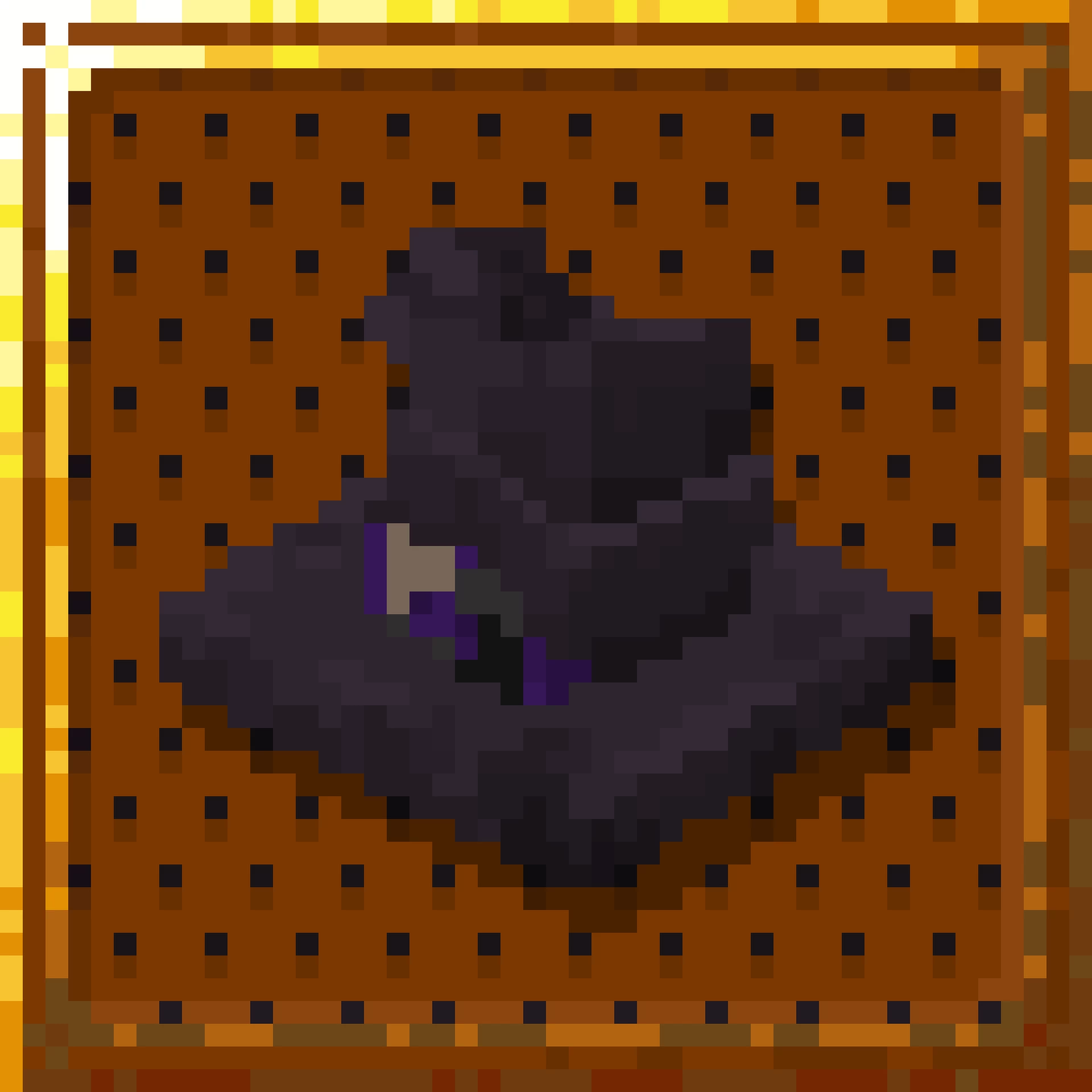
October is here, and the countdown for the spookiest day of the year has begun! Join in the spooktacular festivities with this wicked witch's hat to accompany whatever costumes you choose to don. Show of your apparel to your friends at a costume party, or use this hat to complete the look for making evil elixirs. Have a happy fall season, and a happy Halloween!
This isn't a traditional resource pack, but instead uses an uncommon feature of OptiFine to modify player models. Instead of being something that is worn on your head, which has model limitations, this model is completely fleshed out, and doesn't obstruct wearing armor on your head.

If you want to read a spooky story, here is something we wrote last season: A Dark Faerie Tale
Additionally, if you would like to watch a very cringey "horror" short, here is an awful machinima we made: The Zombie Alpacalyse
THIS IS NOT A NORMAL RESOURCE PACK, READ INSTALLATION INSTRUCTIONS.
Installation: (All steps are also included in the attached README.txt)
1. First, open your ".minecraft" folder. Then, drag the "playermodels" folder from the "Witch Hat.zip" file into your ".minecraft" folder.
2. Next, open the new "playermodels" folder, and then open the "users" folder. Rename "PLAYERNAME.cfg" to your in-game username, making sure to keep the .cfg at the end of the file name.
3. After that, go back to the "playermodels" folder and open "items". Open "witch_hat", go into "users" and repeat the process this time with "PLAYERNAME.png".
4. If you want to put witch hats on other players, duplicate the .cfg and .png files, and repeat the process with each new player's name.
5. In order to see the model in-game, you will need to open your Minecraft launcher. At the top bar, change to the "Installations" tab, click the three dots when hovering over your OptiFine installation and click "Edit".
6. Open the drop-down menu "More Options". Under "JMV Arguments" scroll all the way to the end, put a space, and paste "-Dplayer.models.local=true". You will need to restart you game for any changes to take effect. Enjoy!
Keeping Santa Hats alternative:
1. Perform step 1 as written above.
2. Open the new "playermodels" folder, and then open the "users" folder. Either rename your existing .cfg file to something else and rename "PLAYERNAME.cfg" to your in-game username, making sure to keep the .cfg at the end of the file name; or follow step 2a.
a. Open "PLAYERNAME.cfg" and copy the lines which read ""type": "witch_hat"," and ""active": "true"" including the curly brackets directly above and below those two lines.
b. Next, open your existing .cfg file and change the "true" in "active" to "false". Now, put a comma after the curly bracket directly below, and add a new line. Paste from the previous step and save the file.
4. Perform steps 4-6 as written above.
If you are interested in learning more about this OptiFine feature, or would simply like a more visual demonstration, I highly recommend watching Ewan Howell's video: How to create custom OptiFine Player Models! [Blockbench Tutorial] [Updated]
If you want to keep up to date on our other projects and any sneak peeks, consider joining our community Discord server.
This isn't a traditional resource pack, but instead uses an uncommon feature of OptiFine to modify player models. Instead of being something that is worn on your head, which has model limitations, this model is completely fleshed out, and doesn't obstruct wearing armor on your head.
If you want to read a spooky story, here is something we wrote last season: A Dark Faerie Tale
Additionally, if you would like to watch a very cringey "horror" short, here is an awful machinima we made: The Zombie Alpacalyse
THIS IS NOT A NORMAL RESOURCE PACK, READ INSTALLATION INSTRUCTIONS.
Installation: (All steps are also included in the attached README.txt)
1. First, open your ".minecraft" folder. Then, drag the "playermodels" folder from the "Witch Hat.zip" file into your ".minecraft" folder.
2. Next, open the new "playermodels" folder, and then open the "users" folder. Rename "PLAYERNAME.cfg" to your in-game username, making sure to keep the .cfg at the end of the file name.
3. After that, go back to the "playermodels" folder and open "items". Open "witch_hat", go into "users" and repeat the process this time with "PLAYERNAME.png".
4. If you want to put witch hats on other players, duplicate the .cfg and .png files, and repeat the process with each new player's name.
5. In order to see the model in-game, you will need to open your Minecraft launcher. At the top bar, change to the "Installations" tab, click the three dots when hovering over your OptiFine installation and click "Edit".
6. Open the drop-down menu "More Options". Under "JMV Arguments" scroll all the way to the end, put a space, and paste "-Dplayer.models.local=true". You will need to restart you game for any changes to take effect. Enjoy!
Keeping Santa Hats alternative:
1. Perform step 1 as written above.
2. Open the new "playermodels" folder, and then open the "users" folder. Either rename your existing .cfg file to something else and rename "PLAYERNAME.cfg" to your in-game username, making sure to keep the .cfg at the end of the file name; or follow step 2a.
a. Open "PLAYERNAME.cfg" and copy the lines which read ""type": "witch_hat"," and ""active": "true"" including the curly brackets directly above and below those two lines.
b. Next, open your existing .cfg file and change the "true" in "active" to "false". Now, put a comma after the curly bracket directly below, and add a new line. Paste from the previous step and save the file.
4. Perform steps 4-6 as written above.
If you are interested in learning more about this OptiFine feature, or would simply like a more visual demonstration, I highly recommend watching Ewan Howell's video: How to create custom OptiFine Player Models! [Blockbench Tutorial] [Updated]
If you want to keep up to date on our other projects and any sneak peeks, consider joining our community Discord server.
© 2022 Voyde Studios
More like this
 Dee's Wearable Witch Hats | CIT Pack16x Minecraft 1.19 Themed Texture Pack
 Deesaster
7/1/22 2:29
• posted 9/27/20 1:38
34.5k 5k 19x 11149154
Deesaster
7/1/22 2:29
• posted 9/27/20 1:38
34.5k 5k 19x 11149154 Player Santa Hats16x Minecraft 1.18 Themed Texture Pack
 Voyde Studios
•12/6/21 6:56
14.5k 2.3k 28x 413197
Voyde Studios
•12/6/21 6:56
14.5k 2.3k 28x 413197
 Witches Hat Pack16x Minecraft 1.17 Themed Texture Pack
 Cloudybee
•10/19/21 7:42
4.8k 635 1x 4817
Cloudybee
•10/19/21 7:42
4.8k 635 1x 4817 The Witch Hunters16x Minecraft 1.20.1 Themed Texture Pack
 IvanTheSpaceBiker
•8/12/26 11:48
289 104x 431
IvanTheSpaceBiker
•8/12/26 11:48
289 104x 431
 Agvit
Agvit5726820
4








 ThatYoutubeHater

 Paravoxel
 Hakks
Hakks
 Beizyy
 Gutomat64
 lockheartlove
Have something to say?