

• 5/2/24 10:23 pm
- 1.5k views • 0 today
- 64
- 49
- 61

760
You have no idea how many times I've been asked this question. (I never counted, so neither do I)
And because it happens so often, I decided to make a little tutorial on how to do it. Hope this helps.
Ok, so you know how this pops up when you click in the type box on a wall post?

Click the little <> circled above. This opens the BBCode.
A box labeled "BBCode Source" should pop up. It looks like this:
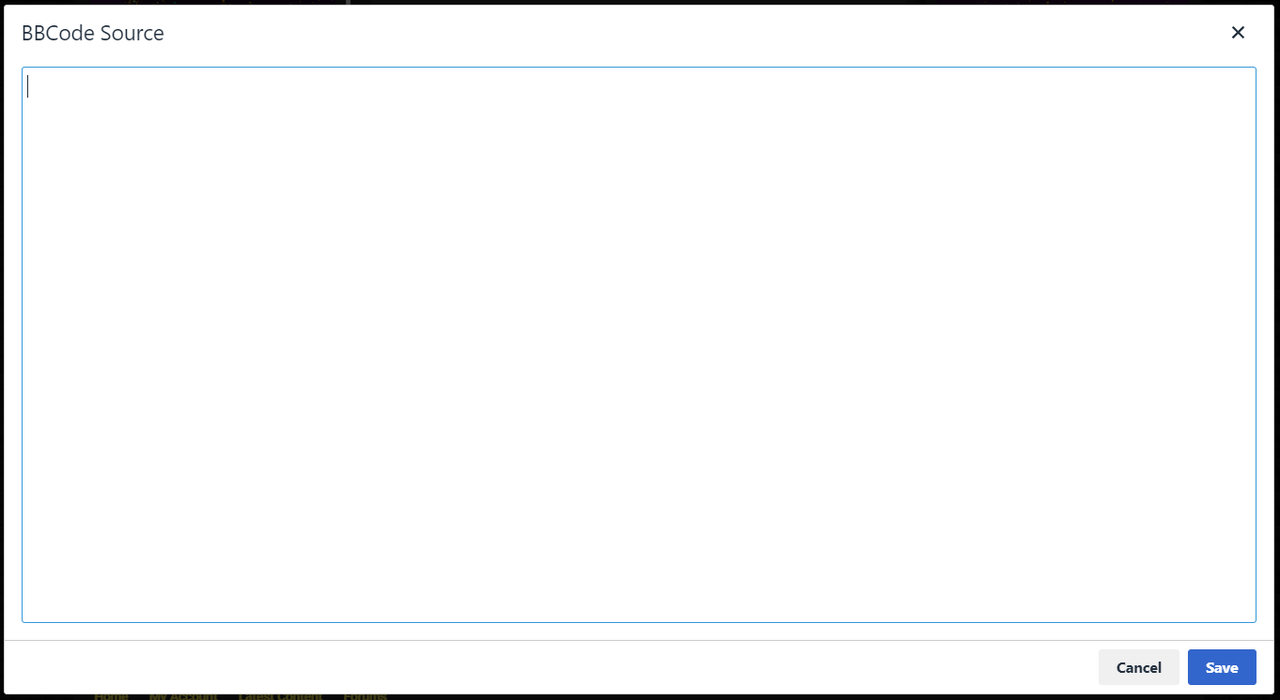 It's blinding white even in dark mode. Yes, I know, positively aggravating.
Anyway, here's the tricky part. (At least I assume it's tricky, because this is the part where so many people get lost)
1. Type in:
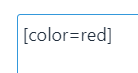
If you already have text in the wallpost, it will appear in the bbcode. Make sure to type this bit of code before your text.
You might notice the word "red" in there. That makes the text red. If you don't want your text to be red, you could replace the word "red" with the name of any color you like. Say, blue.
You can also use a hex code. Make sure to keep the #
2. Now, if you don't already have text in your wallpost, this is where you put it.
3. After your text type in:

It should look something like this:

Of course, instead of "My amazing going to be colored text" it would have whatever you typed.
4. In the bottom right corner, there should be a "Cancel" and "Save" button. Click "Save"

5. And you're finished! Now you have colored text!

If you see something like the following, you probably spelled something wrong.
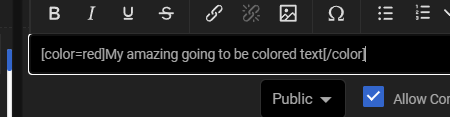
To fix this, delete the codes you put in, close the bbcode, reopen it, and type your codes back in.
And because it happens so often, I decided to make a little tutorial on how to do it. Hope this helps.
Ok, so you know how this pops up when you click in the type box on a wall post?
Click the little <> circled above. This opens the BBCode.
A box labeled "BBCode Source" should pop up. It looks like this:
It's blinding white even in dark mode. Yes, I know, positively aggravating.Anyway, here's the tricky part. (At least I assume it's tricky, because this is the part where so many people get lost)
1. Type in:
If you already have text in the wallpost, it will appear in the bbcode. Make sure to type this bit of code before your text.
You might notice the word "red" in there. That makes the text red. If you don't want your text to be red, you could replace the word "red" with the name of any color you like. Say, blue.
You can also use a hex code. Make sure to keep the #
2. Now, if you don't already have text in your wallpost, this is where you put it.
3. After your text type in:
It should look something like this:
Of course, instead of "My amazing going to be colored text" it would have whatever you typed.
4. In the bottom right corner, there should be a "Cancel" and "Save" button. Click "Save"
5. And you're finished! Now you have colored text!
If you see something like the following, you probably spelled something wrong.
To fix this, delete the codes you put in, close the bbcode, reopen it, and type your codes back in.
More like this
 How to Get Colored Text in Book and QuillsTutorial Blog
 DarkKillerM
4/16/16 4:16
• posted 4/15/16 8:20
7.2kx 133
DarkKillerM
4/16/16 4:16
• posted 4/15/16 8:20
7.2kx 133


 How to write colored text in book ! (no command needed)Tutorial Blog
 Mrthomas20121
•1/8/17 2:08
2.2k 4x 131
Mrthomas20121
•1/8/17 2:08
2.2k 4x 131
 I am the Doctor
 roland1235
 ChesynePlaysMC
6264919
6
![It's All in my Imagination. [Story Snippet] Minecraft Blog](https://static.planetminecraft.com/files/image/minecraft/blog/2026/637/19532671-jailbarsstock_s.jpg)
![My Cold, Cold heart. [Short Scene From a Story that Doesn't Exist] Minecraft Blog](https://static.planetminecraft.com/files/image/minecraft/blog/2026/431/19474051-snowstockscreenshot_s.jpg)
![When does time stop? [Short Story] Minecraft Blog](https://static.planetminecraft.com/files/image/minecraft/blog/2025/350/19323438-dustyhand_s.jpg)

![The Downsides of Smelling Nice [story thing] Minecraft Blog](https://static.planetminecraft.com/files/image/minecraft/blog/2025/399/19093914-yellowjacket-webp_s.jpg)



 Cylexic947


 uzvarua

Have something to say?