
• 4/14/16 8:58 pm
- 427 views • 0 today
- 2
- 0

21
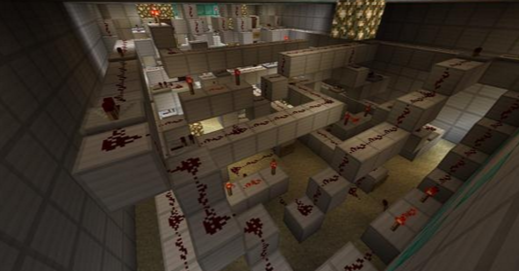
Here's a guide to every single redstone item in the game:
Dispenser: The dispenser, when activated by redstone, will shoot out whatever is inside it. Some things drop as items, others drop in unique ways. As an example, if you put a spawn egg in there, it will spawn the mob. Water and lava shoot out that water and lava, and suck it back in the next time it's activated.
Sticky Piston: The sticky piston will push certain blocks when activated, and retract them when deactivated. Some blocks, such as furnaces, obsidian, and bedrock will not be affected by sticky pistons.
Piston: Extremely similar to the sticky piston, except it doesn't retract blocks when deactivated.
Lever: The lever will activate redstone when flipped on, and will turn off the redstone when flipped off.
Stone/Wooden Pressure Plate: When stepped on, these pressure plates will activate redstone, and will deactivate a little bit of time after you step off of them.
Redstone Torch: A redstone torch will activate redstone when it is on (which it is by default). However, if the torch is powered by redstone in a way so the torch doesn't power the redstone, the torch turns off, so the redstone stops powering. This is useful for piston doors.
Stone/Wooden Button: When pressed, the button will create a temporary redstone signal. Stone buttons give longer signals than wooden buttons.
Lamp: The lamp turns on when powered, and turns off when not powered. This is used for tests or for demonstration.
Tripwire Hook: Two tripwire hooks can be attached using string, and when walked into, will perform a redstone signal. These are useful for traps.
Trapped Chest: Trapped chest work just like regular chests, except they activate a redstone signal when opened.
Weighted Pressure Plate: Weighted pressure plates can be activated by all entities, including items (dropped with Q by default). The more items on the pressure plate, the greater of a signal given.
Daylight Sensor: When it is day, the daylight sensor creates a redstone signal. This can be switched to night mode by right clicking it.
Redstone Block: This one is simple. It just powers redstone.
Hopper: Hoppers collect items and drop them into something else that is connected to it. This may be a chest, furnace, or even another hopper!
Dropper: The dropper is extremely similar to the dispenser, except it only drops the item put into it.
Redstone Dust/Wire: This is the most basic component of redstone. This connects redstone together, creating a wire.
Repeater: The repeater only takes redstone in one direction, and can only be activated in one direction. It can be used to make redstone travel through opac blocks (like stone, wood, etc.), not transparent blocks (leaves, slabs, glass, etc.). It also sets the redstone signal strength back to 15, however, takes up a one tick delay, which can be adjusted to be as long as four ticks.
Comparator: The comparator can compare two redstone signal strengths, and power redstone based on the number of items in a hopper, chest, or even an amount of cake! It can also subtract signal strength from your redstone when put on subtract mode (by right clicking it), which is useful for redstone clocks.
And that's it! If you have any questions, feel free to comment and ask! :D
Dispenser: The dispenser, when activated by redstone, will shoot out whatever is inside it. Some things drop as items, others drop in unique ways. As an example, if you put a spawn egg in there, it will spawn the mob. Water and lava shoot out that water and lava, and suck it back in the next time it's activated.
Sticky Piston: The sticky piston will push certain blocks when activated, and retract them when deactivated. Some blocks, such as furnaces, obsidian, and bedrock will not be affected by sticky pistons.
Piston: Extremely similar to the sticky piston, except it doesn't retract blocks when deactivated.
Lever: The lever will activate redstone when flipped on, and will turn off the redstone when flipped off.
Stone/Wooden Pressure Plate: When stepped on, these pressure plates will activate redstone, and will deactivate a little bit of time after you step off of them.
Redstone Torch: A redstone torch will activate redstone when it is on (which it is by default). However, if the torch is powered by redstone in a way so the torch doesn't power the redstone, the torch turns off, so the redstone stops powering. This is useful for piston doors.
Stone/Wooden Button: When pressed, the button will create a temporary redstone signal. Stone buttons give longer signals than wooden buttons.
Lamp: The lamp turns on when powered, and turns off when not powered. This is used for tests or for demonstration.
Tripwire Hook: Two tripwire hooks can be attached using string, and when walked into, will perform a redstone signal. These are useful for traps.
Trapped Chest: Trapped chest work just like regular chests, except they activate a redstone signal when opened.
Weighted Pressure Plate: Weighted pressure plates can be activated by all entities, including items (dropped with Q by default). The more items on the pressure plate, the greater of a signal given.
Daylight Sensor: When it is day, the daylight sensor creates a redstone signal. This can be switched to night mode by right clicking it.
Redstone Block: This one is simple. It just powers redstone.
Hopper: Hoppers collect items and drop them into something else that is connected to it. This may be a chest, furnace, or even another hopper!
Dropper: The dropper is extremely similar to the dispenser, except it only drops the item put into it.
Redstone Dust/Wire: This is the most basic component of redstone. This connects redstone together, creating a wire.
Repeater: The repeater only takes redstone in one direction, and can only be activated in one direction. It can be used to make redstone travel through opac blocks (like stone, wood, etc.), not transparent blocks (leaves, slabs, glass, etc.). It also sets the redstone signal strength back to 15, however, takes up a one tick delay, which can be adjusted to be as long as four ticks.
Comparator: The comparator can compare two redstone signal strengths, and power redstone based on the number of items in a hopper, chest, or even an amount of cake! It can also subtract signal strength from your redstone when put on subtract mode (by right clicking it), which is useful for redstone clocks.
And that's it! If you have any questions, feel free to comment and ask! :D
More like this

 SwordSmith
 monstrus
 10hop10
 Sniped_
 theminecrafter10
3590009
6
![MiNCeraFT thEOrY: yyOU r a kEYBoArd?! [Parody] Minecraft Blog](https://static.planetminecraft.com/files/resource_media/screenshot/1632/human-fingers-leave-bacterial-imprint-on-keyboards10429297_thumb.jpg)
![What Makes Me a MINECRAFTER? [Parody] Minecraft Blog](https://static.planetminecraft.com/files/resource_media/screenshot/1631/large10424710_thumb.jpg)









 rogue core
 Fantino2011
 uzvarua
Have something to say?