
• 12/13/12 2:40 pm
- 433 views • 0 today
- 3
- 1
- 5

3
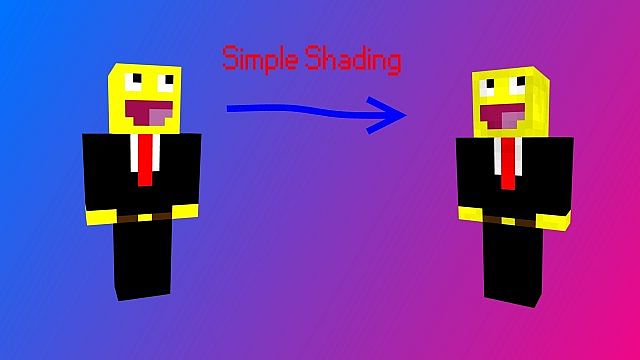
Hey Guys, Lately I have Been Skinning and I have been Having Trouble and I know some of my Friends are so I made a Template skin and a Tutorial.
~You Will Need~
Paint.NET
The "Shading" Skin
Step 1:
Download the "Shading" Skin here
Step 2: Open the Skin that you want to Shade in Paint.NET

Step 3: Open the "Shading" Skin in Paint.NET but Add it as a Layer

Step 4: Go to Layer > Properties or do "F4"

Step 5: Click on "Mode" and Select "Multiply"

Congratulations, You have Now Shaded your Skin, If you don't have a Hat on your skin then Just Delete the Hat Part.

~You Will Need~
Paint.NET
The "Shading" Skin
Step 1:
Download the "Shading" Skin here
Step 2: Open the Skin that you want to Shade in Paint.NET
Step 3: Open the "Shading" Skin in Paint.NET but Add it as a Layer
Step 4: Go to Layer > Properties or do "F4"
Step 5: Click on "Mode" and Select "Multiply"
Congratulations, You have Now Shaded your Skin, If you don't have a Hat on your skin then Just Delete the Hat Part.
More like this

 。◕‿◕。 Hair Shading: A Simple Pictorial 。◕‿◕。Tutorial Blog
 drifblim_s
•11/3/13 5:55
10.9k 68x 1118115
drifblim_s
•11/3/13 5:55
10.9k 68x 1118115

 Simple Short Skin Technique for newbies. (REALLY EASY)Tutorial Blog
 10101010101010101
•11/6/12 4:52
572 1x 131
10101010101010101
•11/6/12 4:52
572 1x 131
 Remmicious
 bitinc
 gonewiththetimes
1718211
6

 bugboyxeno
 Austrian_Shipbuilding


 Nightheart



Have something to say?
thnx man
any answers
this is really awesome though im gonna subsribe