
- 4
- 0
- 6

5
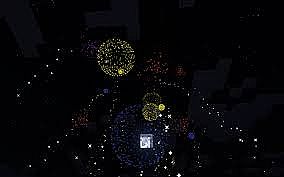
Are you wondering how to spawn Awsome fireworks,
With commandblocks?
Then stop searching!
I'm Gonna learn you how to do that!
Step one: A regular Rocket-Entity!
Type/Copy&paste this Command in your Commandblock:
/summon FireworksRocketEntity ~ ~ ~ {LifeTime:20}
All that Basically does is spawning a Firework Rocket, The tag {LifeTime:20} Is how long the rocket fly's in Ticks.
Step two: Adding Effects!
Type/Copy&paste this Command in your Commandblock:
/summon FireworksRocketEntity ~ ~2 ~ {LifeTime:20,FireworksItem:{id:401,Count:1,tag:{Fireworks:{Explosions:[{Flicker:1,Trail:1,Type:1,Colors:0],FadeColors:[0]}]}}}}
This command spawns a FireworkEntity With a Ball Effect The effect is Customizable but ill tell you more about that later.
Step three: Multiple Effects!
Type/Copy&paste this Command in your Commandblock:
/summon FireworksRocketEntity ~ ~2 ~ {LifeTime:20,FireworksItem:{id:401,Count:1,tag:{Fireworks:{Explosions:[{Flicker:1,Trail:1,Type:1,Colors:0],FadeColors:[0]},{Flicker:1,Trail:1,Type:2,Colors:[16777215],FadeColors:[16777215]},{Flicker:1,Trail:1,Type:3,Colors:[15000],FadeColors:[15000]}]}}}}
This spawns An effect IN a Effect. You can FULLY Customize This! Its really usefull for Firework Shows!
Step Four: Direct Explosion!
Type/Copy&paste this Command in your Commandblock:
/summon FireworksRocketEntity ~ ~0 ~ {LifeTime:0,FireworksItem:{id:401,Count:1,tag:{Fireworks:{Explosions:[{Flicker:1,Trail:1,Type:1,Colors:0],FadeColors:[0]},{Flicker:1,Trail:1,Type:2,Colors:[16777215],FadeColors:[16777215]},{Flicker:1,Trail:1,Type:3,Colors:[15000],FadeColors:[15000]}]}}}
You can do this with every previous Firework-Spawning-Command. Just set the Tag {LifeTime} To 0,
That forces the Entity to Explode directly! Just like in Hypixel Maps!
Types for the Type tag!
0= Small Ball
1= Large Ball
2= Star
3= Creeper Face
4= Burst
Colors for Coloring youre firework!
White: 14540253
Orange: 14384446
Purple: 11751612
Light Blue: 7047881
Yellow: 11642407
Lime: 4304440
Pink: 13665433
Gray: 4210752
Light Gray: 10133921
Cyan: 3042953
Purple: 8273333
Blue: 3029133
Brown: 5190175
Green: 3491355
Red: 9843760
Black: 1644054
Thank you for reading!
If you have any suggestions leave them in the comments!
If i made Mistakes please say it.
Sorry for my English its not very good!
Bye!
With commandblocks?
Then stop searching!
I'm Gonna learn you how to do that!
Step one: A regular Rocket-Entity!
Type/Copy&paste this Command in your Commandblock:
/summon FireworksRocketEntity ~ ~ ~ {LifeTime:20}
All that Basically does is spawning a Firework Rocket, The tag {LifeTime:20} Is how long the rocket fly's in Ticks.
Step two: Adding Effects!
Type/Copy&paste this Command in your Commandblock:
/summon FireworksRocketEntity ~ ~2 ~ {LifeTime:20,FireworksItem:{id:401,Count:1,tag:{Fireworks:{Explosions:[{Flicker:1,Trail:1,Type:1,Colors:0],FadeColors:[0]}]}}}}
This command spawns a FireworkEntity With a Ball Effect The effect is Customizable but ill tell you more about that later.
Step three: Multiple Effects!
Type/Copy&paste this Command in your Commandblock:
/summon FireworksRocketEntity ~ ~2 ~ {LifeTime:20,FireworksItem:{id:401,Count:1,tag:{Fireworks:{Explosions:[{Flicker:1,Trail:1,Type:1,Colors:0],FadeColors:[0]},{Flicker:1,Trail:1,Type:2,Colors:[16777215],FadeColors:[16777215]},{Flicker:1,Trail:1,Type:3,Colors:[15000],FadeColors:[15000]}]}}}}
This spawns An effect IN a Effect. You can FULLY Customize This! Its really usefull for Firework Shows!
Step Four: Direct Explosion!
Type/Copy&paste this Command in your Commandblock:
/summon FireworksRocketEntity ~ ~0 ~ {LifeTime:0,FireworksItem:{id:401,Count:1,tag:{Fireworks:{Explosions:[{Flicker:1,Trail:1,Type:1,Colors:0],FadeColors:[0]},{Flicker:1,Trail:1,Type:2,Colors:[16777215],FadeColors:[16777215]},{Flicker:1,Trail:1,Type:3,Colors:[15000],FadeColors:[15000]}]}}}
You can do this with every previous Firework-Spawning-Command. Just set the Tag {LifeTime} To 0,
That forces the Entity to Explode directly! Just like in Hypixel Maps!
Types for the Type tag!
0= Small Ball
1= Large Ball
2= Star
3= Creeper Face
4= Burst
Colors for Coloring youre firework!
White: 14540253
Orange: 14384446
Purple: 11751612
Light Blue: 7047881
Yellow: 11642407
Lime: 4304440
Pink: 13665433
Gray: 4210752
Light Gray: 10133921
Cyan: 3042953
Purple: 8273333
Blue: 3029133
Brown: 5190175
Green: 3491355
Red: 9843760
Black: 1644054
Thank you for reading!
If you have any suggestions leave them in the comments!
If i made Mistakes please say it.
Sorry for my English its not very good!
Bye!
4 Update Logs
Update #4 : by drawguy124 01/30/2015 5:55:40 pmJanuary 30, 2015 @ 10:55 pm UTC
Happy new year
LOAD MORE LOGS
More like this


 This is how you make Fireworks and Different Kinds of Fireworks!Tutorial Blog
 DiS
•3/10/13 4:22
1.7kx 11
DiS
•3/10/13 4:22
1.7kx 11

 Obiwan7
 Chilylugia2
 SciTyx
2922768
6






 Adventures of WildGoat
 Xeno_X1
 Aedan5
 princess tratinczica
 uzvarua
Have something to say?
that should work IIRC