
• 5/1/23 4:40 am
- 446 views • 0 today
- save_alt 13 downloads
- Compatibility
- Minecraft 1.13
- to version
- Minecraft 1.19
- Changes include
- Recipes

8
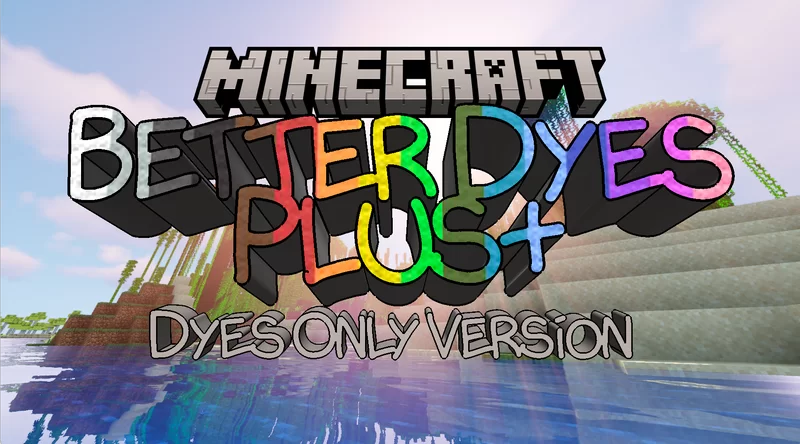
A datapack I made for my own worlds with a few minor quality of life changes in regards to flowers and dyes.
The original version of this datapack also has additional quality of life changes. To see the original version, click here. To see a version with additional quality of life changes, but without a gunpowder recipe, click here.
- All white flowers now make white dye instead of light grey (exception: oxeye daisy now makes yellow, because daisies are Pollen Central and it's a funny thought to me.)
- Blue orchids now make blue dye instead of light blue.
- Alliums now also make purple dye instead of magenta.
- Brown dye can now be mathematically made from complimentary colors.
- Logic fix: green dye can also now be crafted by merging yellow and blue dyes.
- Black dye can now be made vegan-ly by adding complimentary colors plus brown, adding two sets of complimentary dyes, or by adding all primary/all secondary colors (ie red-yellow-blue equals black, orange-purple-green equals black).
- Most dyeable blocks are now redyeable in quantities of 1 or 8 blocks of the same base color (wool, terracotta, glass, glass panes, concrete powder, carpet, candles, and beds in singles only).
- For items that have an "undyed" base state, a la terracotta, they can be reverted to base state using lapis lazuli like a dye! This also includes shulkers, which are redyeable in base game, but not "un"-dyeable.
To install in a solo world:
1. Create a new world; navigate to and select "Data Packs."
2. Drag the data pack into the Minecraft window as a .zip file (do not unzip!).
3. Click "Yes" on the confirmation screen.
4. Move the data pack to the active list via the arrow buttons.
5. Click "Done," then click "Create New World".
The original version of this datapack also has additional quality of life changes. To see the original version, click here. To see a version with additional quality of life changes, but without a gunpowder recipe, click here.
- All white flowers now make white dye instead of light grey (exception: oxeye daisy now makes yellow, because daisies are Pollen Central and it's a funny thought to me.)
- Blue orchids now make blue dye instead of light blue.
- Alliums now also make purple dye instead of magenta.
- Brown dye can now be mathematically made from complimentary colors.
- Logic fix: green dye can also now be crafted by merging yellow and blue dyes.
- Black dye can now be made vegan-ly by adding complimentary colors plus brown, adding two sets of complimentary dyes, or by adding all primary/all secondary colors (ie red-yellow-blue equals black, orange-purple-green equals black).
- Most dyeable blocks are now redyeable in quantities of 1 or 8 blocks of the same base color (wool, terracotta, glass, glass panes, concrete powder, carpet, candles, and beds in singles only).
- For items that have an "undyed" base state, a la terracotta, they can be reverted to base state using lapis lazuli like a dye! This also includes shulkers, which are redyeable in base game, but not "un"-dyeable.
To install in a solo world:
1. Create a new world; navigate to and select "Data Packs."
2. Drag the data pack into the Minecraft window as a .zip file (do not unzip!).
3. Click "Yes" on the confirmation screen.
4. Move the data pack to the active list via the arrow buttons.
5. Click "Done," then click "Create New World".
More like this
 Better Dyes PlusMinecraft 1.13 - 1.19 Crafting Recipe Data Pack
 JonquilAndLace
•5/1/23 4:30
2k 86x 1021
JonquilAndLace
•5/1/23 4:30
2k 86x 1021 CoalDyeMinecraft 1.14 - 1.21 Crafting Recipe Data Pack
 MISTERPUG51
8/28/24 9:53
• posted 6/6/24 3:22
1.2k 135x 311
MISTERPUG51
8/28/24 9:53
• posted 6/6/24 3:22
1.2k 135x 311![Re-Dye Terracotta - [PurpurPack] Minecraft Data Pack](https://static.planetminecraft.com/files/image/minecraft/data-pack/2023/707/17047580-fefcacdaaceaf_s.jpg) Re-Dye Terracotta - [PurpurPack]Minecraft 1.20 - 1.21 Crafting Recipe Data Pack
Re-Dye Terracotta - [PurpurPack]Minecraft 1.20 - 1.21 Crafting Recipe Data Pack RhythmicSys
•8/8/23 11:08
976 79x 243
RhythmicSys
•8/8/23 11:08
976 79x 243 Better Dyes Plus (No Gunpowder Version)Minecraft 1.13 - 1.19 Crafting Recipe Data PackJonquilAndLace
•5/1/23 4:47
349 6x 13
Better Dyes Plus (No Gunpowder Version)Minecraft 1.13 - 1.19 Crafting Recipe Data PackJonquilAndLace
•5/1/23 4:47
349 6x 13 Nik's Craftables - DyesMinecraft 26.1 Crafting Recipe Data Pack
 nik_at_knight
•6/13/26 6:52
69 3x 71
nik_at_knight
•6/13/26 6:52
69 3x 71
5928895
119



 gw2
gw2







 The wither storm fan



Have something to say?