



• • 4/13/23 8:07 pm • 1 logs
- 4k views • 0 today
- save_alt 138 downloads
- Compatibility
- Minecraft 1.18
- to version
- Minecraft 1.19
- Changes include
- Functions
- Loot Tables

28
Patreon: Quin Studios
Discord: https://discord.gg/R2P4VGC
Instagram: @quinstudios
About:
This datapack allows you to customize and change the author of a written book. Supports Minecraft versions 1.18+.
To change the author name of a book, just follow these steps
Installation
New World:
Existing World:
Discord: https://discord.gg/R2P4VGC
Instagram: @quinstudios
About:
This datapack allows you to customize and change the author of a written book. Supports Minecraft versions 1.18+.
To change the author name of a book, just follow these steps
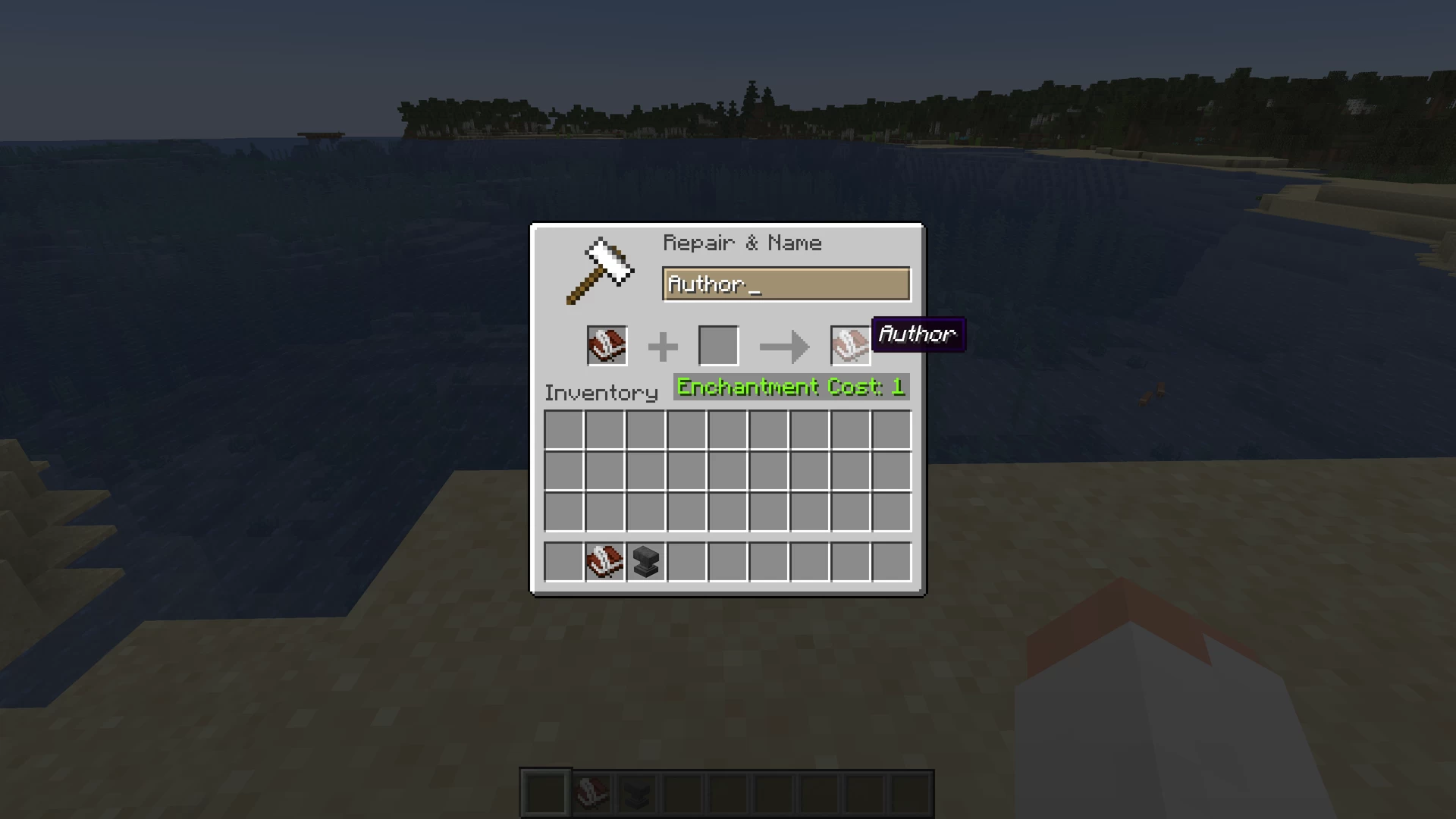
- Take a Book and Quill, and rename it to "Author" with an anvil.
- On the first page, write the author name, however you want it to display.
- Put the named book and quill in your offhand, and open a written book that you want to change the author of.
- And voila, you're done! The new author name should now display properly.
As of version 2.0, you can also change book titles with this same method, only using a book and quill named "Title" instead of "Author". This method can be used to overcome the vanilla character limit for book titles, allowing you to now make books with titles potentially stretching even beyond the edges of your screen.
Installation
New World:
- Select Data Packs in the world creation menu (in 1.19.4+, select the More tab at the top of the screen first)
- Drag and drop the download into the Minecraft window, then select Yes to add the pack
- Click the arrow on the pack icon to load the pack, and then select Done
- Load and play your world, and follow the setup guide that pops up
Existing World:
- Navigate to your world folder. You can open it from the worlds menu by selecting your world, Edit, and then Open World Folder
- Go into the datapacks folder, and move the download there
- Load your world
- Type /reload, and then follow the setup guide that pops up
1 Update Logs
Update #1 : by QuinoaFalafel 04/13/2023 8:07:54 pmApril 14, 2023 @ 12:07 am UTC
4/13/2023:
Added the ability to change book titles as well, allowing you to overcome the vanilla character limit
Added the ability to change book titles as well, allowing you to overcome the vanilla character limit
More like this
 Custom Ender Dragon Fight - 12 New Attacks!Minecraft 1.16 - 1.17 Game Mechanic Data Pack
 TacoWenzdayz
9/11/21 1:32
• posted 9/30/20 10:09
15.7k 1.9k 25x 24649
TacoWenzdayz
9/11/21 1:32
• posted 9/30/20 10:09
15.7k 1.9k 25x 24649
 Ride Mobs (light version)Minecraft 1.20 Game Mechanic Data Pack
 AlpalcaLad
•11/12/23 11:23
1.6k 114x 275
AlpalcaLad
•11/12/23 11:23
1.6k 114x 275
 MC-271843 RecontinuedMinecraft 1.21 Game Mechanic Data PackJerboaWings
•5/19/24 10:56
435 18 2x 111
MC-271843 RecontinuedMinecraft 1.21 Game Mechanic Data PackJerboaWings
•5/19/24 10:56
435 18 2x 111
 opeepo
 that_mar
5908078
119






 CarrotNoRanch






 SpikeMakesDatapacks
![TreeChopper [26.3] | Insta-Timber & AutoReplant Minecraft Data Pack](https://static.planetminecraft.com/files/image/minecraft/data-pack/2026/569/20161576-wtitegl-gfpzsb-wzlkelpck-udvmyjybzsxmiapyjwo-heocsfoqgouurx_s.jpg)
 NxxYas1
![Vein Miner [26.3] Minecraft Data Pack](https://static.planetminecraft.com/files/image/minecraft/data-pack/2026/888/20162613-nxxyasi_s.jpg)

 kacpisz620
Have something to say?
If that wasn't your issue, I tested the rest of the pack functionality and it works fine in 1.20.2, even though the pack format isn't updated and it displays red when adding the pack to the world. I'm still looking into a minor update to the pack so that it changes the new "filtered_title", even though it seems useless and unnecessary for the pack to work, and I'll update the pack format then so that it officially supports 1.20.2
I'm also going to look into another method for changing the book titles. I think I might be able to use the method normally used for naming items, instead of using the actual book title. The drawback is that it might require slanted writing like normal renamed items.