


• • 7/16/26 4:25 am • 4 logs
- 6.2k views • 1 today
- save_alt 383 downloads
- Compatibility
- Minecraft 1.21
- to version
- Minecraft 26.2
- Changes include
- Functions
- Loot Tables
- Predicates
- Recipes
Added CreditAntoha256M

41
In collaboration with
 Antoha256M
📖 About
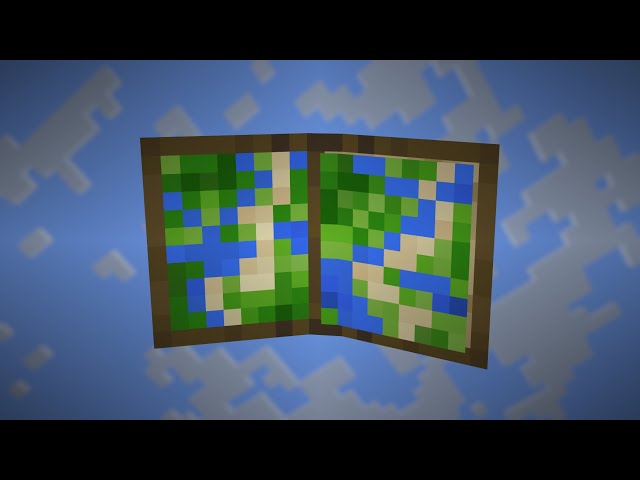
This datapack adds an atlas in which you can put maps, the atlas will automatically show the map for the player's position.
To change the preferred scaling, you need to swap the atlas twice, starting from the off hand.
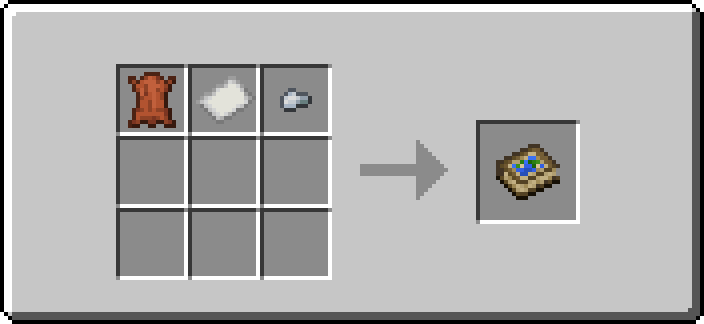
📗 Recipes
Atlas recipe:
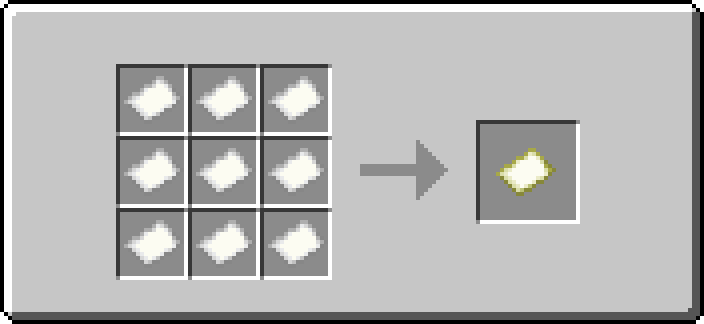
Changed map recipe:
⛔️ Known Issues
These issues cannot be fixed or are only partially fixed
- Since the atlas is technically a `minecraft:bundle`, it can be recolored (this is not displayed visually).
4 Update Logs
Update 2.1.2 : by Antoha256M 07/16/2026 4:25:53 amJuly 16 @ 8:25 am UTC
- Just supports up to 26.2.
LOAD MORE LOGS
More like this
 Vanilla Utilities - Enhanced Mechanics (v2.1)Minecraft 1.20 - 1.21 Game Mechanic Data Pack
 XZYTDL
9/2/24 4:33
• posted 9/8/23 8:16
38.6k 6.8k 73x 198116
XZYTDL
9/2/24 4:33
• posted 9/8/23 8:16
38.6k 6.8k 73x 198116 Vanilla ExpansionMinecraft 1.16 - 1.19 Quality of Life Data Pack
 coopersully
6/19/21 12:30
• posted 3/18/21 11:37
14.1k 1.3k 2x 43544
coopersully
6/19/21 12:30
• posted 3/18/21 11:37
14.1k 1.3k 2x 43544![Manipulator 2.1 [1.18] Minecraft Data Pack](https://static.planetminecraft.com/files/image/minecraft/data-pack/2022/383/15323598-manipulator_s.jpg) Manipulator 2.1 [1.18]Minecraft 1.17 - 1.18 Quality of Life Data Pack
Manipulator 2.1 [1.18]Minecraft 1.17 - 1.18 Quality of Life Data Pack MannyGoesMeow
•1/21/22 11:35
3.8k 423 2x 1510
MannyGoesMeow
•1/21/22 11:35
3.8k 423 2x 1510 PeacefullERMinecraft 1.20 Quality of Life Data Pack
 danegraphics
2/1/24 3:30
• posted 1/30/24 9:58
3k 185 4x 11311
danegraphics
2/1/24 3:30
• posted 1/30/24 9:58
3k 185 4x 11311 Fast Forward Enchantment / Version 1.20 - 1.20.2Minecraft 1.20 Quality of Life Data Pack
 WoodItBeOk
•1/7/24 5:37
1.7k 40x 143
WoodItBeOk
•1/7/24 5:37
1.7k 40x 143
6496894
119















Have something to say?
Should it be in different folder?
I've tried it, and when I swap the atlas twice, starting from the left hand, I get a message saying that the scale has been changed, but it doesn't work :(
What could be the solution?