


• 9/4/20 2:08 am
- 6.3k views • 1 today
- save_alt 189 downloads
- Compatibility
- Minecraft 1.16
- Changes include
- Functions


7
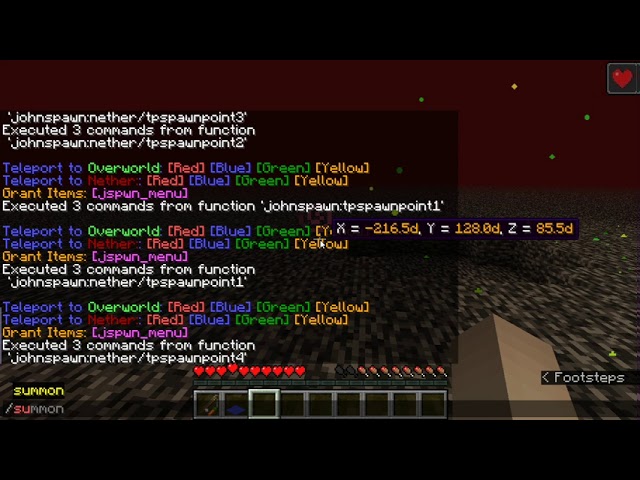
datapack for creating check point in overworld and nether
total of 8 check points available (4 in overworld and 4 in nether)
What can you do with check point:
1. TP to other check points
2. respawn at the lastest check point you TP to (can respawn in nether)
3. Get a regeneration buff
4. No other entity (mobs and projectile, like skeleton and arrows) can enter the check point except you
5. knowing the coordinates of the check point so you won't get lost
How to use:
1. install the datapack and type /reload
2. select and right click the controller, a menu will show in chat
3. interact with the menu to Set, Unset, and teleport to check point
I lost the controller from this datapack, what to do:
There are multiple ways to invoke the menu:
1. left click on the spawn point name
OR
2. type the following command: /trigger jspwn_menu
OR
3. reload the datapack and it will give you the controller by typing /reload
Some details:
The menu invoked by controller involves check point in current dimension, so you can't deal with the check points in other dimensions
The menu invoked at spawn point allows you to teleport to all 8 check points, meaning you can TP across dimensions
When a new spawn point is too close to other spawn point (within ~10blocks), it will replace the old spawn point
The particles around spawn point indicates the distance of protection from other entity
Uninstall:
type the following command to remove all checkpoints and variables:
/function johnspawn:cleanup
total of 8 check points available (4 in overworld and 4 in nether)
What can you do with check point:
1. TP to other check points
2. respawn at the lastest check point you TP to (can respawn in nether)
3. Get a regeneration buff
4. No other entity (mobs and projectile, like skeleton and arrows) can enter the check point except you
5. knowing the coordinates of the check point so you won't get lost
How to use:
1. install the datapack and type /reload
2. select and right click the controller, a menu will show in chat
3. interact with the menu to Set, Unset, and teleport to check point
I lost the controller from this datapack, what to do:
There are multiple ways to invoke the menu:
1. left click on the spawn point name
OR
2. type the following command: /trigger jspwn_menu
OR
3. reload the datapack and it will give you the controller by typing /reload
Some details:
The menu invoked by controller involves check point in current dimension, so you can't deal with the check points in other dimensions
The menu invoked at spawn point allows you to teleport to all 8 check points, meaning you can TP across dimensions
When a new spawn point is too close to other spawn point (within ~10blocks), it will replace the old spawn point
The particles around spawn point indicates the distance of protection from other entity
Uninstall:
type the following command to remove all checkpoints and variables:
/function johnspawn:cleanup
More like this

 More Random Spawn PointMinecraft 1.16 - 1.17 Tool Data Pack
 iheartstriders
11/25/20 3:26
• posted 8/26/20 10:58
7k 380 14x 11611
iheartstriders
11/25/20 3:26
• posted 8/26/20 10:58
7k 380 14x 11611 Perfect SpawnMinecraft 1.13 - 1.16 Quality of Life Data Pack
 Libre007
•4/30/20 1:19
4k 163 4x 165
Libre007
•4/30/20 1:19
4k 163 4x 165 Better SpawningMinecraft 1.13 - 1.15 Quality of Life Data PackLibre007
•4/30/20 12:43
2.7k 107x 133
Better SpawningMinecraft 1.13 - 1.15 Quality of Life Data PackLibre007
•4/30/20 12:43
2.7k 107x 133 Checkpoints Datapack (1.21.1)Minecraft 1.21 Other Data Pack
 creakingblock27
•1/22/26 2:54
418 40 1x 112
creakingblock27
•1/22/26 2:54
418 40 1x 112
 nphhpn
4747527
119






 Kirbycope
 Juillyoom



 AhmedTurysta
 CammoKitty95

 Skapningen

Have something to say?