


• • 1/26/26 3:17 pm • 17 logs
- 22.7k views • 0 today
- save_alt 1k downloads
- Compatibility
- Minecraft 1.17
- to version
- Minecraft 1.21
- Changes include
- Advancements
- Functions
- Predicates

547
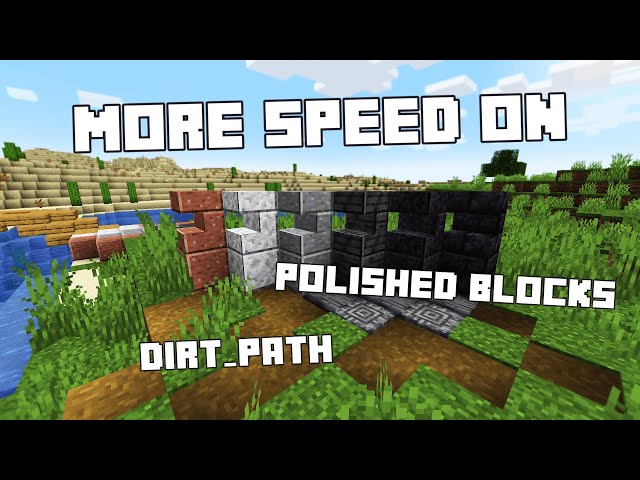
Fast Paths Together grants you (and your vehicle) move speed on dirt_path and polished blocks!
This work is licensed under the Creative Commons Attribution-NonCommercial-NoDerivatives 4.0 International. An exception is made for video content which can be monetized under the condition of credits attribution according to the license. To view a copy of this license, visit https://creativecommons.org/licenses/by-nc-nd/4.0/legalcode.
An exception is made for video, image, sound, blog, and any other media that would share the project. If the purpose of the content is sharing, the content creator may monetize the content. Content creators must simply give appropriate credit and provide a link to the original work.

Features
- Grant some speed on dirt_path and polished blocks (default +30%).
- Hide polished_blocks underground (at player y-2) and get the speed effect as well.
- Use vehicles on path to get the speed as well.
Autopath Generator (default OFF)
This system is now DISABLED by default. It is an experimental feature that spawn a lot of markers on the grass, where people walk. So, it doesn't suit servers or multiplayer very well as it can build up the entity count very fast. Still, the feature is pretty cool, so you can enabling it (and deal with the consequences!)/scoreboard players set AutoPath fktvl.options 1
- The auto-path generator turn grass_block into dirt_path after few steps on the block. (should be disabled on large server)
- Auto-path renew: go back to grass if players no longer use this path.
- Auto-path overload: if too many players, path may turn into dirt, or mud if it's rainy.
Options
To adjust options to your needs, use:/function fktvl:options/get
Patreon Supporters
1.21.9 (01/12/2025) : CYKLOPPS, Azerxim, varinyc, Setsu-P, Wani P, Lionel Felke, nfnpgllxhn
1.21.5 (2025-07-17) : CYKLOPPS, Azerxim, Setsu-P, varinyc, Wani P
1.21.2 (2024-11-15) : Screaming Man, ZMH, Darklad32, CYKLOPPS, Azerxim, Aidan McCreary, varinyc, Setsu-P, Maximilian Adler, ODS, Jamie B
1.21 (2024-07-01) : 아아앨, Screaming Man, ZMH, Darklad32, CYKLOPPS, Aidan McCreary, Azerxim, Setsu-P, Gaming Grotto, Kobe Prokopetz
1.20.5+ (2024-05-30) : Angelo Russo, 아아앨, EXcore, Screaming Man, ZMH, Darklad32, CYKLOPPS, Memick Kung, Aidan McCreary, Setsu-P
1.20.4 (2023-12-26) : Angelo Russo, 깔수, Screaming Man, ZMH, Darklad32, CYKLOPPS, God Emperor Leto II Atriedes
1.20 (2023-06-17) : Delivator, Jonathan Fanelli, Angelo Russo, Phantom-Glitch-Wolf, John Stampe, Screaming Man, Dorian Dejean, ooF, ZMH, Yokie, Deadlot3, Darklad32
1.19 Update (2022-06-21) : -
HiddenPath Update (2022-02-03) : -
Vehicle Update (2021-12-12) : -
V1 (2021-07-07) : -
1.21.5 (2025-07-17) : CYKLOPPS, Azerxim, Setsu-P, varinyc, Wani P
1.21.2 (2024-11-15) : Screaming Man, ZMH, Darklad32, CYKLOPPS, Azerxim, Aidan McCreary, varinyc, Setsu-P, Maximilian Adler, ODS, Jamie B
1.21 (2024-07-01) : 아아앨, Screaming Man, ZMH, Darklad32, CYKLOPPS, Aidan McCreary, Azerxim, Setsu-P, Gaming Grotto, Kobe Prokopetz
1.20.5+ (2024-05-30) : Angelo Russo, 아아앨, EXcore, Screaming Man, ZMH, Darklad32, CYKLOPPS, Memick Kung, Aidan McCreary, Setsu-P
1.20.4 (2023-12-26) : Angelo Russo, 깔수, Screaming Man, ZMH, Darklad32, CYKLOPPS, God Emperor Leto II Atriedes
1.20 (2023-06-17) : Delivator, Jonathan Fanelli, Angelo Russo, Phantom-Glitch-Wolf, John Stampe, Screaming Man, Dorian Dejean, ooF, ZMH, Yokie, Deadlot3, Darklad32
1.19 Update (2022-06-21) : -
HiddenPath Update (2022-02-03) : -
Vehicle Update (2021-12-12) : -
V1 (2021-07-07) : -
Patreon Versions
The free versions are designed to be fun and fully playable.
The Patreon version is for players and server owners who want more control, comfort, and flexibility through an in-game settings menu to tweak the parameters live, without file editing.
Becoming a Gold Patreon also means:
- Getting access to every Patreon versions of every projects.
- Getting your name listed in each project and on this page (see above).
- Supporting long-term development, updates, and new features 💛
The Patreon version is for players and server owners who want more control, comfort, and flexibility through an in-game settings menu to tweak the parameters live, without file editing.
Becoming a Gold Patreon also means:
- Getting access to every Patreon versions of every projects.
- Getting your name listed in each project and on this page (see above).
- Supporting long-term development, updates, and new features 💛
Add your blocks to the Path System
You can add your blocks to the path-list in the file datapacks/Travelers/data/fktvl/tags/blocks/custom_path.json
1. Replace, add or duplicate the line "minecraft:dirt_path" by your desire block. Exemple : "minecraft:podzol"
2. Save the file, and use /reload in game.
If it no longer works :
- Make sure to use real block names (any mistake will break the datapack).
- Take care or the "," punctuation between lines, and not at the last line.
- Save again, reload again.
1. Replace, add or duplicate the line "minecraft:dirt_path" by your desire block. Exemple : "minecraft:podzol"
2. Save the file, and use /reload in game.
If it no longer works :
- Make sure to use real block names (any mistake will break the datapack).
- Take care or the "," punctuation between lines, and not at the last line.
- Save again, reload again.
Issue / Bug
Dirth_path VS grass_block
When destroying a generated dirth_path, wait for fiew 10 seconds before placing a grass_block, otherwise it will be replaced by the dirth_path again.
When destroying a generated dirth_path, wait for fiew 10 seconds before placing a grass_block, otherwise it will be replaced by the dirth_path again.
Licence
Short story: just credit the project, thanks ;)

By downloading this work, you automatically accept the license protecting it.
By downloading this work, you automatically accept the license protecting it.
This work is licensed under the Creative Commons Attribution-NonCommercial-NoDerivatives 4.0 International. An exception is made for video content which can be monetized under the condition of credits attribution according to the license. To view a copy of this license, visit https://creativecommons.org/licenses/by-nc-nd/4.0/legalcode.
An exception is made for video, image, sound, blog, and any other media that would share the project. If the purpose of the content is sharing, the content creator may monetize the content. Content creators must simply give appropriate credit and provide a link to the original work.
[project name] : [project link]
Visitors Stats
17 Update Logs
1.21.11 Update : by FunkyToc 01/26/2026 3:17:09 pmJanuary 26 @ 8:17 pm UTC
1.21.11 fixes
LOAD MORE LOGS
More like this
 Speed on Paths, Now including horses!Minecraft 1.16 - 1.19 Game Mechanic Data Pack
 Aceplante
•3/5/22 3:26
4k 650 6x 12931
Aceplante
•3/5/22 3:26
4k 650 6x 12931
 Traveled Roads - Dynamic Dirt Paths! v1.1Minecraft 1.16 - 1.17 Game Mechanic Data Pack
 CptnJTK
6/24/21 6:51
• posted 12/24/20 10:21
4k 140x 1910
CptnJTK
6/24/21 6:51
• posted 12/24/20 10:21
4k 140x 1910 Speed on paths! (actually balanced)Minecraft 1.16 - 1.19 Game Mechanic Data PackAceplante
•3/4/22 12:44
3.1k 436 8x 12316
Speed on paths! (actually balanced)Minecraft 1.16 - 1.19 Game Mechanic Data PackAceplante
•3/4/22 12:44
3.1k 436 8x 12316
 DCoded
 Adamus444
5188462
119

![Deep Blue : Ocean Survival [26.x] Minecraft Data Pack](https://static.planetminecraft.com/files/image/minecraft/data-pack/2026/444/19736372-dbos-cover_s.jpg)
![Better Vanilla Mobs [26.x] Minecraft Data Pack](https://static.planetminecraft.com/files/image/minecraft/data-pack/2026/204/19735160-bm-cover_s.jpg)
![Ocean Breaths [26.x] Minecraft Data Pack](https://static.planetminecraft.com/files/image/minecraft/data-pack/2026/894/19735176-ob-cover_s.jpg)
![RP Campfire [26.x] Minecraft Data Pack](https://static.planetminecraft.com/files/image/minecraft/data-pack/2026/210/19735083-rpcampfire-cover_s.jpg)

 JeZoofyGopter17









 Xenton


 Vent_Puer
Have something to say?
But I'm pretty sure you can find a "player speed attribute" modifier that do exactly what you ask for!
it seems datapack working opposite way. dirt path block turn to grass blcok when player step in 1~2 times.
It was, indeed, the auto path generator detecting a path that has not been walked enougth, and so it reboot it as a grass path.
Does it works on other mobs? Like the villagers, would their steps generate the paths?
And will the original paths in villages renew into grass block?
Other entities do not produce paths, this features would be to heavy for servers.
Original paths are permanent and won't dispawn on walk.
(Note that, placing a dirt_path on a previous grass_block may update the block. To fix that, break the grass_block and wait 10s before placing the dirt_path)
What will happen when a block updates? The path_block I put will renew to a grass_block?
And I was going to ask that, what if I use shovel to turn the grass to path? Will it be permanent too?
The logic start when a player walk on a grass block. This block is now under the datapack's control, counting the steps and updating the block if required. If you want to change this controled block, it's ok, the datapack will leave this block if it's not a dirt path or a grass block. The exception comes if you want to turn it back into grass block or dirt path: in this case the datapack won't understand it has to leave the block ^^
So, break the block, wait 10 seconds (max check loop duration), then place your block!
Thank you for your patience! Im definitely gonna enjoy your work and I’ll put it into my modpack and video, and you’ll be in credit and the description, FunkyToc the CREATOR!!