

• • 5/24/14 6:09 pm • 1 logs
- 3k views • 0 today
- save_alt 350 downloads
- Game Version
- Minecraft 1.7.8
- Progress
- 100% complete

206
Makegearedmobs
Description:
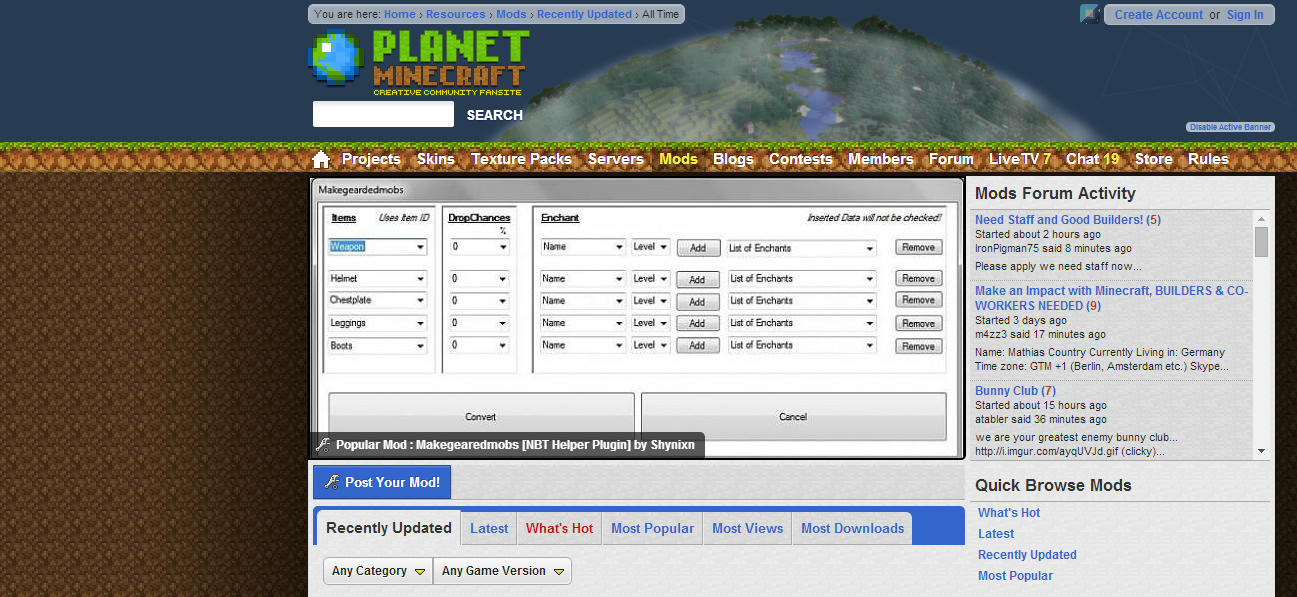
It does what the name says. Select in a simple menü armor and weapons for mobs, give them enchantments and set the dropchance.
Commands which use this nbt data:
{
Equipment:[{id:51,Count:1,tag:{ench:{id:20 ,lvl:18}]}},{},{},{},{}],
DropChances:[0.10f,0.0f,0.0f,0.0f,0.0f]
}
Install:
Download NBT Helper
Download Makegearedmobs
Put the makegearedmobs.exe in the nbthelper_plugins folder.
Run nbthelper.exe
How to install with pictures for every step click here and scroll down!
How to use:
1. Open NBT-HELPER and double-click Makegearedmobs
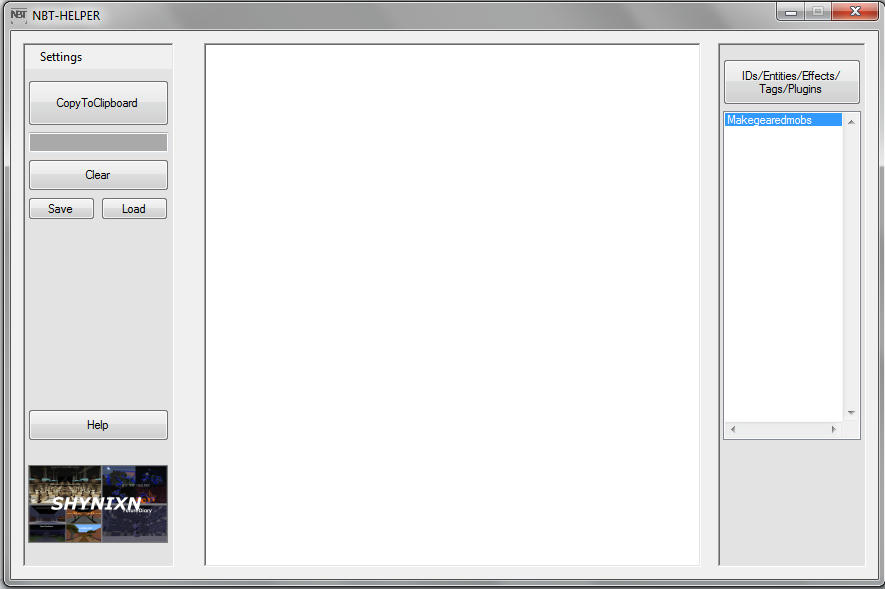
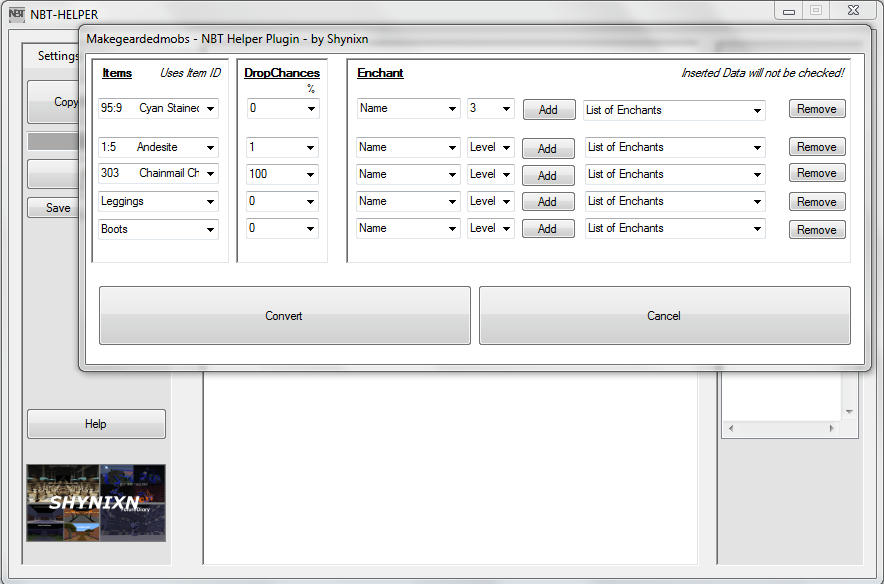
2. Select the wanted items, dropchances, enchantments and press Convert
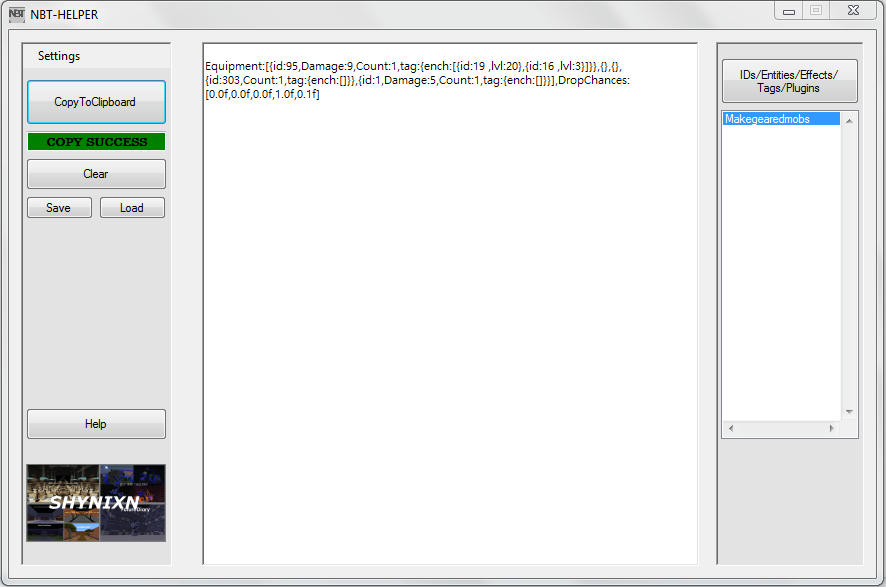
3. Press CopyToClipboard
4. Open Minecraft and write /summon <EntityName> [x] [y] [z]

5. Insert the nbtdata from your ClipBoard using CTRL+V
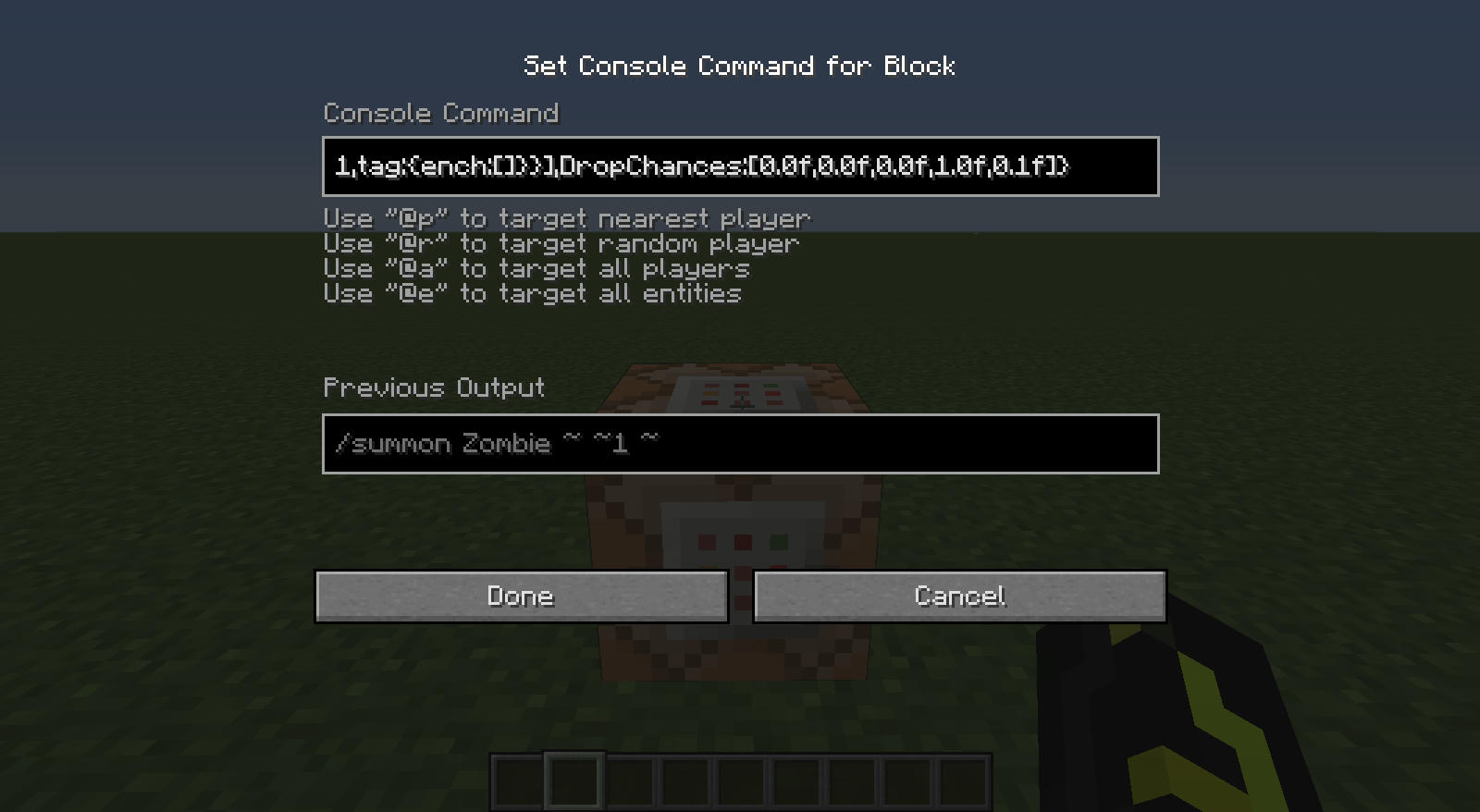
6. Finished

Ideas, Tips? Write it to the comments!
Like it? Give me a diamond!
More plugins? Write it to the comments what plugin you want!
Description:
It does what the name says. Select in a simple menü armor and weapons for mobs, give them enchantments and set the dropchance.
Commands which use this nbt data:
/summon <EntityName> [x] [y] [z] [dataTag]
/summon Zombie ~ ~ ~{
Equipment:[{id:51,Count:1,tag:{ench:{id:20 ,lvl:18}]}},{},{},{},{}],
DropChances:[0.10f,0.0f,0.0f,0.0f,0.0f]
}
Install:
Download NBT Helper
Download Makegearedmobs
Put the makegearedmobs.exe in the nbthelper_plugins folder.
Run nbthelper.exe
How to install with pictures for every step click here and scroll down!
How to use:
1. Open NBT-HELPER and double-click Makegearedmobs
2. Select the wanted items, dropchances, enchantments and press Convert
3. Press CopyToClipboard
4. Open Minecraft and write /summon <EntityName> [x] [y] [z]
5. Insert the nbtdata from your ClipBoard using CTRL+V
6. Finished
Ideas, Tips? Write it to the comments!
Like it? Give me a diamond!
More plugins? Write it to the comments what plugin you want!
1 Update Logs
Update #1 - V2.0.0 : by Shynixn 05/24/2014 6:09:23 pmMay 24, 2014 @ 10:09 pm UTC
- Fixed Bug with id:metadata items
- Can be started without NBT Helper, pressing convert does nothing without NBT Helper
- Can be started without NBT Helper, pressing convert does nothing without NBT Helper
More like this
 NBT HelperMinecraft 1.7.8 Program Mod
 Shynixn
7/6/14 1:36
• posted 4/9/14 11:56
11.5k 1k 28x 63416
Shynixn
7/6/14 1:36
• posted 4/9/14 11:56
11.5k 1k 28x 63416![CreateSpawners [NBT Helper Plugin] Minecraft Mod](https://static.planetminecraft.com/files/resource_media/screenshot/1420/titel2_thumb.jpg) CreateSpawners [NBT Helper Plugin]Minecraft 1.7.8 Program ModShynixn
5/26/14 3:13
• posted 5/18/14 9:58
7.9k 1.2k 12x 11813
CreateSpawners [NBT Helper Plugin]Minecraft 1.7.8 Program ModShynixn
5/26/14 3:13
• posted 5/18/14 9:58
7.9k 1.2k 12x 11813![CreateRidingMobs [NBT Helper Plugin] Minecraft Mod](https://static.planetminecraft.com/files/resource_media/screenshot/1424/createridingmobstitle_thumb.jpg) CreateRidingMobs [NBT Helper Plugin]Minecraft 1.7.8 Program ModShynixn
•6/12/14 4:00
3.6k 413 12x 184
CreateRidingMobs [NBT Helper Plugin]Minecraft 1.7.8 Program ModShynixn
•6/12/14 4:00
3.6k 413 12x 184![AddPotionEffects [NBT Helper Plugin] Minecraft Mod](https://static.planetminecraft.com/files/resource_media/screenshot/1422/titeladdpotion_thumb.jpg) AddPotionEffects [NBT Helper Plugin]Minecraft 1.7.8 Program ModShynixn
•5/28/14 6:04
3.3k 304 7x 1105
AddPotionEffects [NBT Helper Plugin]Minecraft 1.7.8 Program ModShynixn
•5/28/14 6:04
3.3k 304 7x 1105
 KTo_B_MaMe
2899310
7
![MCBasketball [Minigame|Basketball|GeyserMC|Folia|26.3] Minecraft Mod](https://static.planetminecraft.com/files/image/minecraft/mod/2026/935/20100851-title_s.jpg)
![MCTennis [Minigame|Tennis|GeyserMC|Folia|26.2] Minecraft Mod](https://static.planetminecraft.com/files/image/minecraft/mod/2023/563/17299667-title_s.jpg)
![MCHockey [Minigame|Hockey|GeyserMC|Folia|26.3] Minecraft Mod](https://static.planetminecraft.com/files/image/minecraft/mod/2025/922/18822936-title_s.jpg)
![PetBlocks [GUI|Custom Models|MySQL|Folia|26.3] Minecraft Mod](https://static.planetminecraft.com/files/resource_media/screenshot/1739/petblocks-1506763870_thumb.jpg)
![BlockBall [Minigame|Soccer|Football|Folia|26.3] Minecraft Mod](https://static.planetminecraft.com/files/resource_media/screenshot/1809/blockball-1520026630_thumb.jpg)



 blue-king




Have something to say?
All bugs removed and still works for Nbthelper 4.5.0.
Supports all items now.
Nbthelper Update + CreateSpawners Update + new Plugin will come soon.
I could make adventure maps with this! :D
Add plugins that will make adventure maps creator Happy Not sure what type of plugin :)
By pressing on Convert the selected things will be converted in minecraft nbt data format and will appear in the in the nbt helper program field. (You can write it on your own in the nbt helper or use this plugin to create it faster and easier.) Press then CopyToClipboard to copy it to your clipboard.
Open Minecraft .W rite in the chat/commandblock (example /summon Zombie ~ ~ ~) Press CRTL+V so that it looks like:
/summon Zombie ~ ~ ~
{Equipment:[{id:51,Count:1,tag:{ench:{id:20 ,lvl:18}]}},{},{},{},{}],DropChances:[0.10f,0.0f,0.0f,0.0f,0.0f]}
Then a Zombie will appear with fire as weapon which has fireaspect lvl 18 and Dropchances of 10%.
And yes it works in minecraft vanilla singelplayer.
diamond for you :)