



• • 8/4/12 10:58 am • 5 logs
- 251.1k views • 1 today
- save_alt 81.4k downloads
- Game Version
- Minecraft 1.3.1
- Resolution
- 16x
- Progress
- 95% complete
- Changes include
- Armor
- Art
- Environment
- GUI
- Items
- Misc
- Mobs
- Terrain
Added CreditNintendo, the artists who worked on the classic games

35
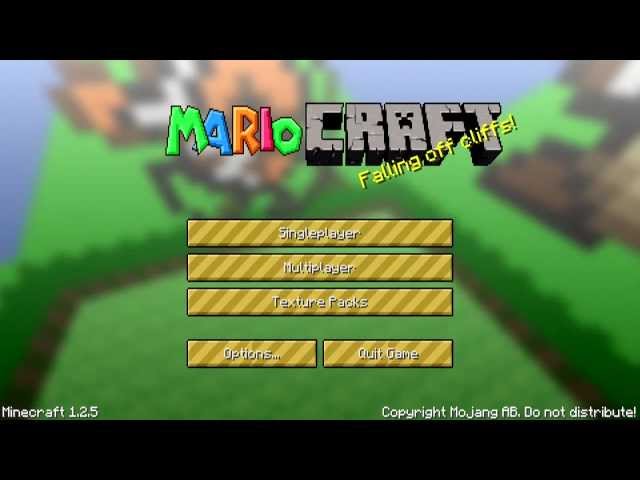
A Mario texture pack!
Video by Zueljin
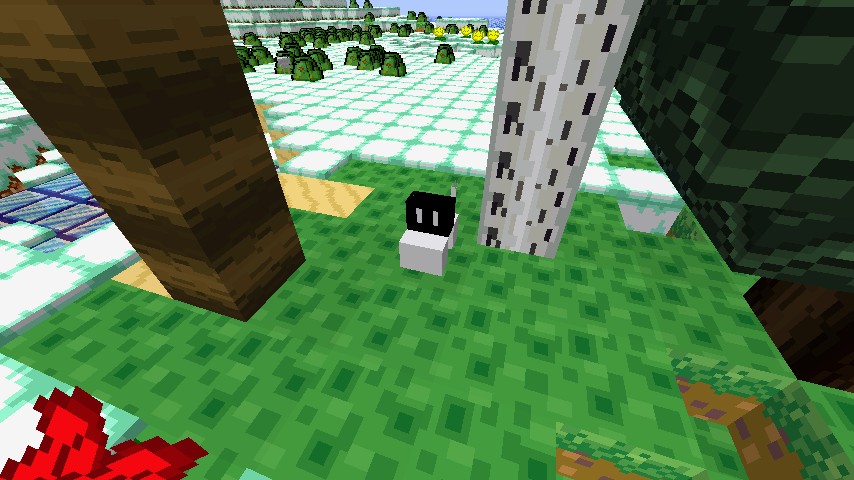
Items and blocks are all based on original sprites from the Mario games for the NES and SNES.
This texture pack is updated itemwise to 1.3.1
All blocks are fully updated to 1.3.1
Mobs are NOT complete; I have most enemies done, and am working on the passives.
Armor is complete! Diamond is a placeholder. I want YOU to decide what it shall be.
Armor
Leather is Mario's clothes. Iron is the Football guy from Super Mario World. Gold is Luigi. Chainmail is Koopa shells.
All GUI images updated to 1.3.1 save for Demo, which I will not update because REAL players will neeever see it.
Video by Zueljin
Items and blocks are all based on original sprites from the Mario games for the NES and SNES.
This texture pack is updated itemwise to 1.3.1
All blocks are fully updated to 1.3.1
Mobs are NOT complete; I have most enemies done, and am working on the passives.
Armor is complete! Diamond is a placeholder. I want YOU to decide what it shall be.
Armor
Leather is Mario's clothes. Iron is the Football guy from Super Mario World. Gold is Luigi. Chainmail is Koopa shells.
All GUI images updated to 1.3.1 save for Demo, which I will not update because REAL players will neeever see it.
5 Update Logs
Update #5 : by Halen2020 08/04/2012 10:58:45 amAugust 4, 2012 @ 2:58 pm UTC
Wow, TEN THOUSAND DOWNLAODS.
I'm speechless...
No, wait, no I'm not. THANK YOU!!! :D
In celebration of this milestone, I'm gonna make this texture pack ANIMATED. That's right.
ANIMATION.
So far, I've got the various solid ore blocks done, as well as the TNT, Furnace, Jack 'o' Lantern, and the question mark ore blocks. What other things should be animated? Feel free to check the terrain and items images to see what I have.
I'm speechless...
No, wait, no I'm not. THANK YOU!!! :D
In celebration of this milestone, I'm gonna make this texture pack ANIMATED. That's right.
ANIMATION.
So far, I've got the various solid ore blocks done, as well as the TNT, Furnace, Jack 'o' Lantern, and the question mark ore blocks. What other things should be animated? Feel free to check the terrain and items images to see what I have.
LOAD MORE LOGS
More like this
 Super Mario Texture Pack V.8.1 (Over 5000 Downloads!)16x Minecraft 1.0 Themed Texture Pack
 ottokar
12/18/11 8:56
• posted 2/2/11 11:50
44.6k 10k 23x 5104
ottokar
12/18/11 8:56
• posted 2/2/11 11:50
44.6k 10k 23x 5104 Super Mario Texture Pack16x Minecraft 1.7.8 Themed Texture Pack
 trew345s
•6/8/14 10:12
5.8k 1.5k 28x 32810
trew345s
•6/8/14 10:12
5.8k 1.5k 28x 32810 Mario Parkour Land Texture Pack32x Minecraft 1.4 Themed Texture Pack
 semaan1
•12/23/12 12:18
4.3k 816 3x 231
semaan1
•12/23/12 12:18
4.3k 816 3x 231 Super Mario MC World: Oddysey Resource Pack32x Minecraft 1.12.2 Themed Texture Pack
 Mason16YT
•1/31/18 10:53
2.8k 408 1x 465
Mason16YT
•1/31/18 10:53
2.8k 408 1x 465 Super Mario Texture Pack16x Minecraft 1.18.1 Themed Texture Pack
 MrTutankhamun
•4/13/22 10:13
1.2k 138 1x 41
MrTutankhamun
•4/13/22 10:13
1.2k 138 1x 41
906393
4
 AntHills

 Kachow95958015



 Hidyk
Hidyk
 Yumi_20s

 CopperCap
 Sweet Satellite
Have something to say?
Just gotta update the new blocks, and I'll have this out!