

• 1/3/24 2:44 pm
- 471 views • 0 today
- 25
- 17
- 7

259
Hey there everyone! Elightin here! I'm one of the judges of the Cholan Palette Battle. After I saw that many had a problem understanding the main rules and how to do it, I decided to make a tutorial on how to do it with visual form as well! HERE WE GO!
1. Select one of the 5 available palettes on the jam's official page --> Cholan Palette Battle Jam on Planet Minecraft
2. Press on the links and review the palettes that were given. Choose which one you want to use for your skin. We'll be using palette #3
3. Use these colors on the skin
With everyone confused about this, I decided to show you how you can use variants of these colors, as it's allowed in the competition.
4. Press the "Shades" button
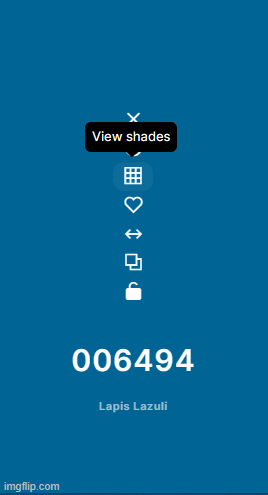
5. Finally, choose the color variant you want to use. This can be used in skin, clothing, eyes, etc!
And that's all!
1. Select one of the 5 available palettes on the jam's official page --> Cholan Palette Battle Jam on Planet Minecraft
2. Press on the links and review the palettes that were given. Choose which one you want to use for your skin. We'll be using palette #3
3. Use these colors on the skin
With everyone confused about this, I decided to show you how you can use variants of these colors, as it's allowed in the competition.
4. Press the "Shades" button
5. Finally, choose the color variant you want to use. This can be used in skin, clothing, eyes, etc!
And that's all!
More like this

 the_soup
 DerpyKat
 ccrom1
 HarleLP
 jakehaker
6159002
6


 GoldGuardYT
 DaMailMan82
 blue-king

 Captain Kai
Have something to say?
and are using some functionality there to expand #006494 into the shades pic shown in step 5
Where on imgflip is this functionality and how does one use it?
Has it been added to the OP yet?
edit: nvm