

• • 4/1/23 7:28 am • 1 logs
- 2.9k views • 0 today
- save_alt 321 downloads
- Compatibility
- Minecraft 1.19
- Changes include
- Functions
- 16
- 8
- 2

Required Resource Pack

15
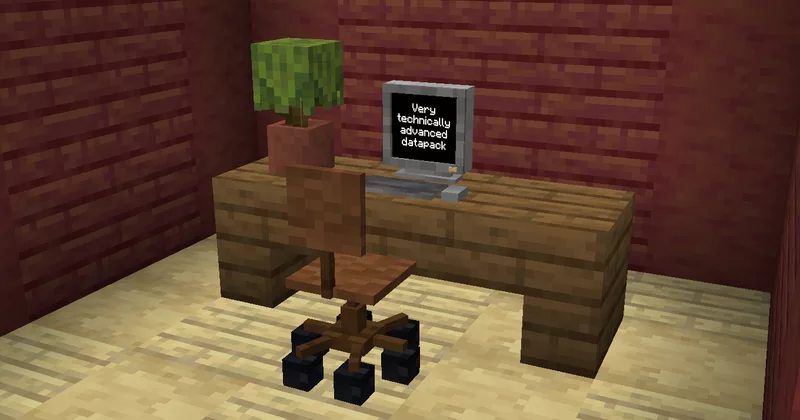
A very technically advanced datapack that adds a computer into the game. Use the command
Right click the computer to start it, and right click it again after the boot sequence to start the application. (currently there's only one, so there's no app selection menu or anything)
(Ignore the older version warning while loading the resourcepack, i just can never set that correctly)
Enjoy!
/loot give @s loot tfp_vtad:item/computerto get the computer. Right click the computer to start it, and right click it again after the boot sequence to start the application. (currently there's only one, so there's no app selection menu or anything)
(Ignore the older version warning while loading the resourcepack, i just can never set that correctly)
Enjoy!
Credits:
- Computer fan and startup sounds: adapted from 90's PC Startup sound by Masman86751 Update Logs
Update #1 : by TheFloatingPixel 04/01/2023 7:28:19 amApril 1, 2023 @ 11:28 am UTC
- Added the chair, without adding the chair
- (Hopefully) fixed a critical bug
More like this
 Hidden doors datapackMinecraft 1.15 - 1.21 Technology Data Pack
 command_creator123
7/14/24 3:51
• posted 4/8/23 3:56
6.4k 759 3x 10813
command_creator123
7/14/24 3:51
• posted 4/8/23 3:56
6.4k 759 3x 10813
 Create Datapacked (Create as a datapack) (OPEN ALPHA)Minecraft 1.21 Technology Data Pack
 Matttttl
•9/3/24 8:32
1.3k 66 2x 156
Matttttl
•9/3/24 8:32
1.3k 66 2x 156
 CALCULATOR DATAPACK 1.21Minecraft 1.21 Technology Data Pack
 Eslayfer9796
•9/14/24 3:03
936 85 3x 2107
Eslayfer9796
•9/14/24 3:03
936 85 3x 2107
 de_douwe
 Thedatacoder
5896307
119








 Lufe
Lufe



 Ryski
Ryski


 shapeshifter_



Have something to say?