


• 10/25/20 6:37 pm
- 4.9k views • 2 today
- save_alt 213 downloads
- Compatibility
- Minecraft 1.16
- to version
- Minecraft 1.17
- Changes include
- Advancements
- Functions
- Recipes
Added CreditCheck the dropdown spoiler above for a list o… info
- 11
- 5
- 1

Required Resource Pack

170
ORBITAL LASERS
For Timber Forge's Space-Themed Datapack Challenge
By Chimerabot
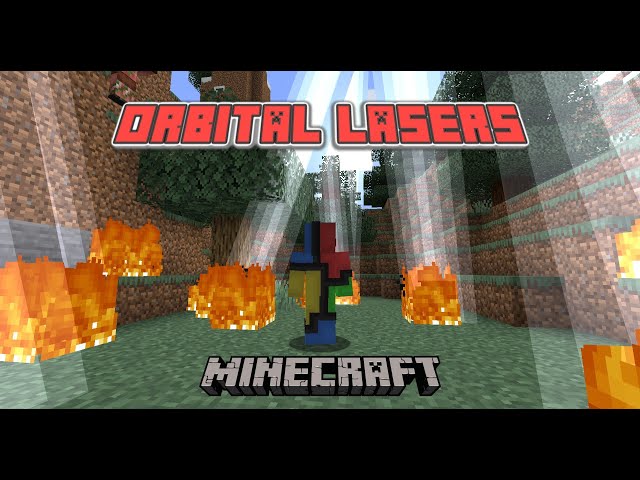
Thanks for checking out my datapack! A few hours of work have gone into it so far, and I'm very satisfied with the result. Essentially, there are two new crafting recipes (shown above) that allow you to create Laser Remotes. Both are very powerful weapons, but are single-use, and are expensive to craft. I attempted to balance these two items for vanilla Survival games.
Laser Remote I: This item is crafted with 5 iron ingots, 1 block of redstone, 1 flint and steel, and 1 diamond. It summons a laser (lightning bolt) at the nearest entity that is not a player, dog, cat, rabbit, villager, armor stand, or item frame. That way, it (probably) won't harm any mobs that may be special to you. Of course, this isn't guaranteeing that it won't destroy your livestock... make sure to be careful.
Laser Remote II: This item is crafted the same as the first remote, except the redstone block is replaced with a lapis block. It summons a circle of lightning bolts around you that don't target any specific mob, so you need to be even more careful with this one. Despite the greater risk, this item is also more powerful for taking out large crowds of enemies.
Again, thanks for checking out my datapack, and have fun!
This datapack was created for Timber Forge's Space-themed datapack challenge. Check it out here.
For Timber Forge's Space-Themed Datapack Challenge
By Chimerabot
Thanks for checking out my datapack! A few hours of work have gone into it so far, and I'm very satisfied with the result. Essentially, there are two new crafting recipes (shown above) that allow you to create Laser Remotes. Both are very powerful weapons, but are single-use, and are expensive to craft. I attempted to balance these two items for vanilla Survival games.
Download Process
- Download "Orbital Lasers.zip" from this page.
- Open Minecraft, and select the world you want to use the data pack in. Before you start up the world, click the "Edit" button, and then click the button in the editing menu titled "Open World Folder".
- Unzip the .zip file you downloaded before, and put the folder inside it in the "datapacks" folder for your world.
- Enter your world, type /reload in chat, and the data pack should start working.
Make sure the resource pack is loaded as well, in Minecraft's resource packs folder. You can open it through the options menu on the home screen.
Laser Remote I: This item is crafted with 5 iron ingots, 1 block of redstone, 1 flint and steel, and 1 diamond. It summons a laser (lightning bolt) at the nearest entity that is not a player, dog, cat, rabbit, villager, armor stand, or item frame. That way, it (probably) won't harm any mobs that may be special to you. Of course, this isn't guaranteeing that it won't destroy your livestock... make sure to be careful.
Laser Remote II: This item is crafted the same as the first remote, except the redstone block is replaced with a lapis block. It summons a circle of lightning bolts around you that don't target any specific mob, so you need to be even more careful with this one. Despite the greater risk, this item is also more powerful for taking out large crowds of enemies.
Videos, Tutorials, Etc. That I've Used
- Timber Forge's amazing tutorial on custom items: Part 1, Part 2, Part 3, and Part 4.
- And, as always, Bertiecrafter's excellent tutorial series on this site about the ins and outs of function datapacks.
Again, thanks for checking out my datapack, and have fun!
This datapack was created for Timber Forge's Space-themed datapack challenge. Check it out here.
More like this


 Laser-Tech DatapackMinecraft 1.13 - 1.18 Mini-game Data Pack
 Mezzomax08
•8/11/21 2:06
5.7k 633 6x 11512
Mezzomax08
•8/11/21 2:06
5.7k 633 6x 11512 Lightsaber DatapackMinecraft 1.13 - 1.18 Other Data Pack
 LgKingdom
•12/16/21 5:43
5.7k 613 2x 174
LgKingdom
•12/16/21 5:43
5.7k 613 2x 174
 eriiic
 DOgDemO
4728206
119



 StiksMC
 ChinaTownSkins




 G3N3ZIS

Have something to say?